
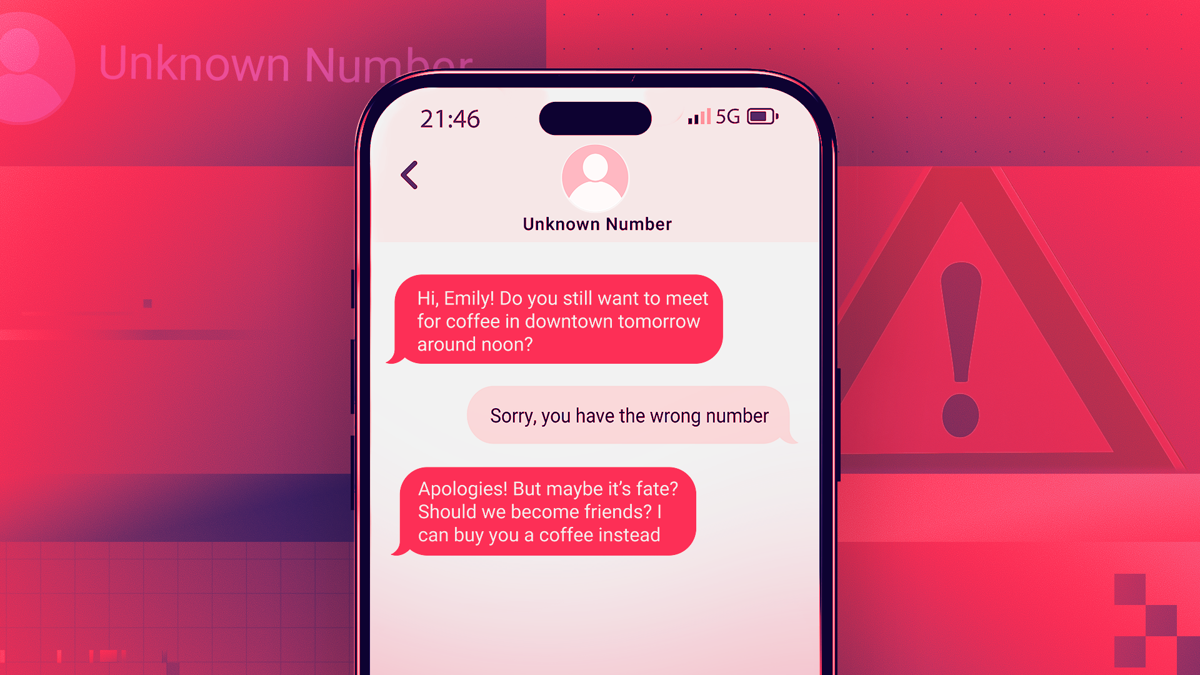

Online scammers work like most other people: They keep a regular schedule. That’s why, given that Valentine’s Day is around the corner, it’s no surprise that many people are seeing an uptick in flirty text messages sent from unfamiliar phone numbers. Those texts are from romance scammers, who are out in full force, trying to trick you into replying to friendly or cute text messages from old friends or former flames, then roping you into clicking on phishing links or investing in fraudulent cryptocurrency schemes. Let’s talk about what to do when you suspect a scam is afoot, and how to fend off misdirected messages in the future.
These types of scams typically begin with friendly or flirtatious messages that may appear to be for someone else. The messages are usually somewhat neutral and often convey some sense of urgency, such as a medical appointment, a missed romantic connection, or a work-related problem, so the recipient feels compelled to reply and set the sender straight. It’s social engineering at its cleverest and most evil because it relies on natural human emotions like curiosity, empathy, and kindness to work.
When a person responds to one of these texts, the scammer will reply, usually in a similarly friendly way, to apologize for the wrong-number text. That’s not where the conversation ends, though. The scammer will try to engage the person in further conversation.
The chat turns romantic sooner rather than later, and ends when the scammer requests cold hard cash, asks the person to join their crypto investment group, or sends the person a donation link. By this time, the person may have been texting with the scammer for days or weeks, and thinks nothing of handing over their money, personal information, or both to their new online suitor.
And what happens next? The typical online romance scam drill: The scammer disappears with the victim’s identity and money, deactivates the phone number, and the would-be suitor only has a bunch of texts to show for their trouble.
Not every misdirected text ends in financial ruin, though. Sometimes people reply to these texts, and the conversation appears to end amicably, but that doesn’t mean they didn’t encounter a scammer. By responding to the text, the person may have put themselves on a list of active phone numbers for people willing to reply to texts from unknown numbers. That list is then sold to criminals who can use if for future texting scams.
To add insult to injury, the scam isn’t even a personal attack. That’s because, thanks to AI, the texting process is largely automated, allowing scammers to send out thousands of messages to people throughout the day. AI tools can craft highly personalized messages based on information about you that is accessible to everyone via data broker websites.
“Long time no see! How have you been lately?”
Thanks to a few weekends of diligent digital decluttering and help from personal data removal services, I receive few scam and spam messages on my personal phone. That’s why, when I received the text message above in the middle of the week, I considered replying for a split second. After all, the tone seemed familiar, there weren’t any possibly-phishing links to tap, the person didn’t seem to be selling anything, and the message wasn’t a political missive. What was the harm in simply shooting back a friendly reply to let the texter know I didn’t have their number saved, and asking who they were and who they were trying to reach? Sometimes people are nice! It’s OK to be nice back, right?
As I said, I hesitated for just a moment, and that was all the time I needed to decide not to reply, at least not before taking a few steps to find out who the mystery texter could be. Whenever you encounter friendly texts from unknown numbers, I suggest you also take a moment to consider whether it’s worth replying. Below are my suggestions for other things you can do when you receive texts from unknown numbers.
I didn’t recognize the phone number, the message was very generic in content and tone, and didn’t refer to me by name. With all of this in mind, I knew I wasn’t going to reply, but I still wanted to know who sent the message, if possible. So I entered the phone number into Ecosia to find out if it’s associated with anyone I know.
The search results confirmed my suspicions immediately. The number is listed as a possible spam caller on several spam call reporting sites. The only other search result referenced the phone number on a Russian-language website, which I opted not to open.
When you determine that the message isn’t from anyone you know personally, it’s time to decide what to do next. In my case, I reported the number to my carrier by clicking on the “Report This as Spam” button or link at the bottom of the message, then deleted the message and went about my day. It’s helpful to report these incidents because the data helps agencies like the Federal Trade Commission build cases against scam suspects.
To reduce the frequency and volume of scam and spam messages you receive, try turning on your phone’s or your carrier’s message filters. If you use an iPhone, go to Settings > Apps > Messages, and scroll down to the Message Filtering section. Google automatically sorts Android users’ messages from unknown senders into separate folders.
You should also consider manually removing your data from the largest data broker websites or signing up for a personal data removal subscription. Either method will remove your name and phone number from the public web, even if only temporarily, giving you a break from marketing and spam.
When you get a text from a number you don’t recognize, don’t respond, even if it’s to troll the sender. It’s probably tempting to try to outsmart a scammer, but it’s not worth it! Even if you manage to defeat one scammer, they have more time and resources than you do, and they will return, or send others to drain your bank account and your patience.
In a similar vein, do not click on links in messages sent from unfamiliar phone numbers. It’s the hallmark of a phishing scam, and is likely a malicious link that’s there to hook your personal information from the place where you keep most of it—your phone.
If you were trying to help out a person who you believed reached the wrong number and has responded, stop! Block the phone number, report it, and delete the conversation.
If you did give your info or clicked on a link, go to the FTC site IdentityTheft.gov, which can direct you to what to do in various scam situations from that point forward. There is also a helpful FAQ on the site.
Chandra Steele contributed to this article.
Read Our Editorial Mission Statement and Testing Methodologies.
My Experience
My title is Senior Features Writer, which is a license to write about absolutely anything if I can connect it to technology (I can). I’ve been at PCMag since 2011 and have covered the surveillance state, vaccination cards, ghost guns, voting, ISIS, art, fashion, film, design, gender bias, and more. You might have seen me on TV talking about these topics or heard me on your commute home on the radio or a podcast. Or maybe you’ve just seen my Bernie meme.
I strive to explain topics that you might come across in the news but not fully understand, such as NFTs and meme stocks. I’ve had the pleasure of talking tech with Jeff Goldblum, Ang Lee, and other celebrities who have brought a different perspective to it. I put great care into writing gift guides and am always touched by the notes I get from people who’ve used them to choose presents that have been well-received. Though I love that I get to write about the tech industry every day, it’s touched by gender, racial, and socioeconomic inequality and I try to bring these topics to light.
Outside of PCMag, I write fiction, poetry, humor, and essays on culture.
My Areas of Expertise
- Making incomprehensible tech news easy to understand
- Expanding the boundaries of topics covered in the industry
- Figuring out tips and tricks in apps and on devices and letting you know about them
- Putting together gift guides for everyone in your life
The Technology I Use
All that gadgets is gold for me: my iPhone 11 Pro, my fifth-generation iPad that I use only for streaming videos and music, my iPad mini 4 that I like to take with me whenever I carry a bag that can fit it, and my MacBook Pro. Why are they all different shades of gold, though? What’s going on, Apple?
None of them quite live up to my two past loves: my LG Lotus LX600 phone and my Sony Walkman NW-E005 MP3 player.
I’ve never given up wired earbuds so I was ahead of all those trend pieces. I use a Mangotek Lightning-to-3.5mm headphone jack adapter to connect them to my phone.
I have had so many ebook readers, but I prefer paper to them all. Still, my Kindle Paperwhite is perfect for traveling or when I’m too impatient to wait for a book to be released in paperback.
My title is Senior Features Writer, which is a license to write about absolutely anything if I can connect it to technology (I can). I’ve been at PCMag since 2011 and have covered the surveillance state, vaccination cards, ghost guns, voting, ISIS, art, fashion, film, design, gender bias, and more. You might have seen me on TV talking about these topics or heard me on your commute home on the radio or a podcast. Or maybe you’ve just seen my Bernie meme.
I strive to explain topics that you might come across in the news but not fully understand, such as NFTs and meme stocks. I’ve had the pleasure of talking tech with Jeff Goldblum, Ang Lee, and other celebrities who have brought a different perspective to it. I put great care into writing gift guides and am always touched by the notes I get from people who’ve used them to choose presents that have been well-received. Though I love that I get to write about the tech industry every day, it’s touched by gender, racial, and socioeconomic inequality and I try to bring these topics to light.
Outside of PCMag, I write fiction, poetry, humor, and essays on culture.
All that gadgets is gold for me: my iPhone 11 Pro, my fifth-generation iPad that I use only for streaming videos and music, my iPad mini 4 that I like to take with me whenever I carry a bag that can fit it, and my MacBook Pro. Why are they all different shades of gold, though? What’s going on, Apple?
None of them quite live up to my two past loves: my LG Lotus LX600 phone and my Sony Walkman NW-E005 MP3 player.
I’ve never given up wired earbuds so I was ahead of all those trend pieces. I use a Mangotek Lightning-to-3.5mm headphone jack adapter to connect them to my phone.
I have had so many ebook readers, but I prefer paper to them all. Still, my Kindle Paperwhite is perfect for traveling or when I’m too impatient to wait for a book to be released in paperback.
Read full bio
My Experience
I review privacy tools like hardware security keys, password managers, private messaging apps, and ad-blocking software. I also report on online scams and offer advice to families and individuals about staying safe on the internet. Before joining PCMag, I wrote about tech and video games for CNN, Fanbyte, Mashable, The New York Times, and TechRadar. I also worked at CNN International, where I did field producing and reporting on sports that are popular with worldwide audiences.
In addition to the categories below, I exclusively cover ad blockers, authenticator apps, hardware security keys, and private messaging apps.
The Technology I Use
I like testing new software for work, but I’m less “plugged in” to the internet than I used to be. I tend to read app privacy policies to see what kind of data companies collect, and as a result of those findings, I don’t use many mobile apps. In a similar vein, I was an early adopter of many social media platforms, but now I’m just an infrequent Reddit lurker.
I’m a gear junkie. I split my work time between a 2021 Apple MacBook Pro and a Lenovo ThinkPad. I shoot most of my videos for PCMag using a Canon M50, a Sony A7iii, and a Sony a6000. I edit videos using Final Cut Pro and Adobe Premiere Pro.
I write all of my words for PCMag either in the MS Notepad app on my ThinkPad or the Notes app on my iPhone 12 mini. If I’m traveling and working, I use my iPad to write short articles or take notes.
My dad built me my first computer sometime in the late ’90s, and I used it for reading Encyclopedia Britannica and writing Sailor Moon fan fiction. My first phone was the ubiquitous Nokia candy bar.
I review privacy tools like hardware security keys, password managers, private messaging apps, and ad-blocking software. I also report on online scams and offer advice to families and individuals about staying safe on the internet. Before joining PCMag, I wrote about tech and video games for CNN, Fanbyte, Mashable, The New York Times, and TechRadar. I also worked at CNN International, where I did field producing and reporting on sports that are popular with worldwide audiences.
In addition to the categories below, I exclusively cover ad blockers, authenticator apps, hardware security keys, and private messaging apps.
I like testing new software for work, but I’m less “plugged in” to the internet than I used to be. I tend to read app privacy policies to see what kind of data companies collect, and as a result of those findings, I don’t use many mobile apps. In a similar vein, I was an early adopter of many social media platforms, but now I’m just an infrequent Reddit lurker.
I’m a gear junkie. I split my work time between a 2021 Apple MacBook Pro and a Lenovo ThinkPad. I shoot most of my videos for PCMag using a Canon M50, a Sony A7iii, and a Sony a6000. I edit videos using Final Cut Pro and Adobe Premiere Pro.
I write all of my words for PCMag either in the MS Notepad app on my ThinkPad or the Notes app on my iPhone 12 mini. If I’m traveling and working, I use my iPad to write short articles or take notes.
My dad built me my first computer sometime in the late ’90s, and I used it for reading Encyclopedia Britannica and writing Sailor Moon fan fiction. My first phone was the ubiquitous Nokia candy bar.
Read full bio
PCMag.com is a leading authority on technology, delivering lab-based, independent reviews of the latest products and services. Our expert industry analysis and practical solutions help you make better buying decisions and get more from technology.
For over 40 years, PCMag has been a trusted authority on technology, delivering independent, labs-based reviews of the latest products and services. With expert analysis and practical solutions across consumer electronics, software, security, and more, PCMag helps consumers make informed buying decisions and get the most from their tech. From in-depth reviews to the latest news and how-to guides, PCMag is the go-to source for staying ahead in the digital world.