

Latest news
iPhone users have been begging for RCS messaging for years, and for good reason. It lets you send high-quality photos, videos, and group texts without the MMS compression that blurs everything. While iMessage works well between Apple devices, it isn’t available to non-iPhone users. And sure, third-party apps like WhatsApp or Messenger exist, but bouncing between platforms can be inconvenient.
Now, RCS messaging has finally arrived with iOS 18.1. But ironically, it’s been completely overshadowed by headline features like Apple Intelligence. Don’t let it slip under your radar. Here’s everything you need to know to unlock its full potential.
SMS sends plain text messages, while MMS supports multimedia content. They both rely on cellular networks, work even without an internet connection, and are widely supported by most carriers. RCS, on the other hand, is an upgraded messaging protocol. It brings high-resolution media sharing, read receipts, typing indicators, and improved group chats to traditional messaging. Meanwhile, iMessage is Apple’s proprietary multimedia messaging service. It’s exclusive to Apple devices.
Before using RCS messaging, check if your iPhone meets the requirements. It’s only available on iPhones running iOS 18 or later, and both you and your recipient must have compatible devices and carrier support. Go to Settings > General > About > Carrier, then check whether the IMS Status says Voice, SMS & RCS.
Time needed: 2 minutes
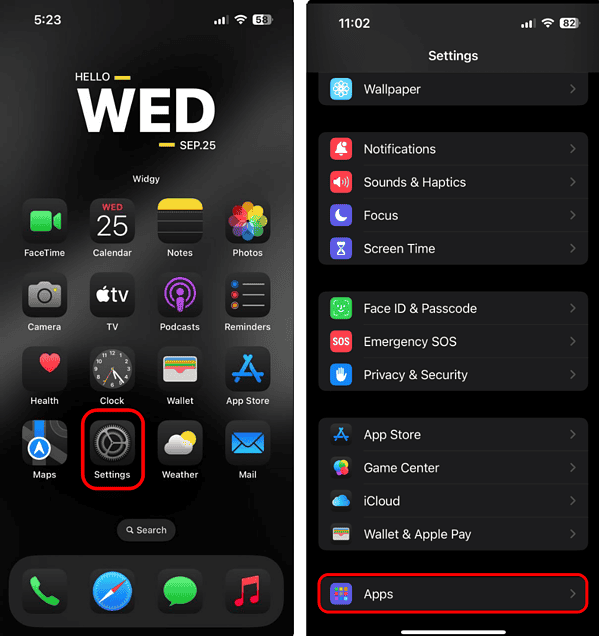
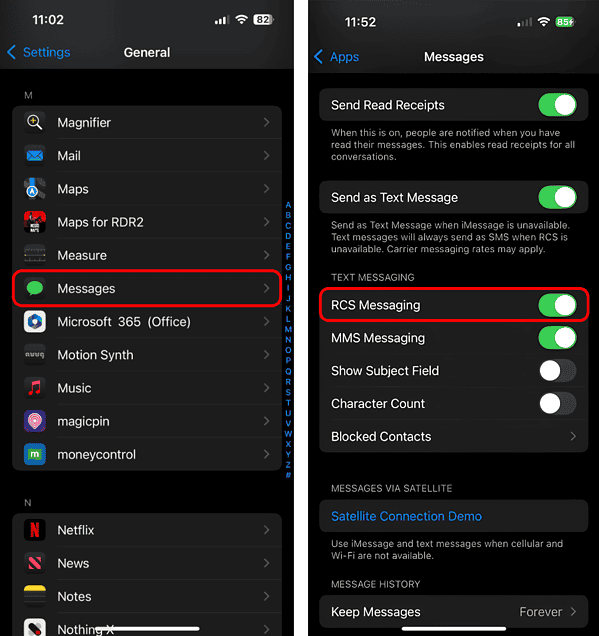
Once you’ve confirmed RCS support, follow these steps:
RCS adds iMessage-like perks (e.g., read receipts and typing indicators) to text messages. You’ll know when someone has seen your message.
Group messaging on RCS feels more interactive than your standard SMS mess. You can name chats, see who’s read your messages, and reply in real time. Whether you’re coordinating a family gathering or a weekend trip with friends, RCS keeps group chats organized and easy to follow.
Need to send a hefty PDF, presentation, or document? RCS supports file sizes up to 100 MB, so you can skip the clunky email process. It’s a straightforward way to share files without worrying about size limits or losing formatting. Just attach and hit send—no iCloud links required.
Pin RCS-enabled conversations to the top of your Messages app to keep them within reach. It’ll get harder and harder to navigate your inbox as you juggle work threads, family updates, and casual chats.
If you’re in an area with poor cellular coverage, RCS automatically connects to available Wi-Fi networks, and vice versa. Your messages, photos, and files will still go through. It’s helpful when you’re traveling or stuck in a dead zone—just keep your Wi-Fi turned on, and you’re good to go.
Chatting with friends or family overseas? RCS eliminates the sting of international SMS fees by using mobile data or Wi-Fi. You’ll get a more affordable, reliable experience while maintaining quality.
Syncing SMS across Apple devices has always been clunky. The Messages app generally prioritizes iMessage. With RCS, it might become easier to manage all messaging protocols across the ecosystem. For now, the full RCS experience still lives on your iPhone. But it’s a step in the right direction and one less reason to reach for your phone when you’re deep into work on your Mac or iPad.
While RCS isn’t fully end-to-end encrypted yet, Apple’s existing privacy tools help keep things secure. Face ID, device-level encryption, and app lock features make sure your chats stay private. It’s a solid way to protect your conversations while waiting for Apple to roll out full encryption for RCS messaging.
RCS messaging on iOS 18 offers a stable texting experience between iPhone and Android users, but it’s not without its quirks. Go through the basic troubleshooting steps before calling Apple Support.
You must be logged in to post a comment.
This site uses Akismet to reduce spam. Learn how your comment data is processed.