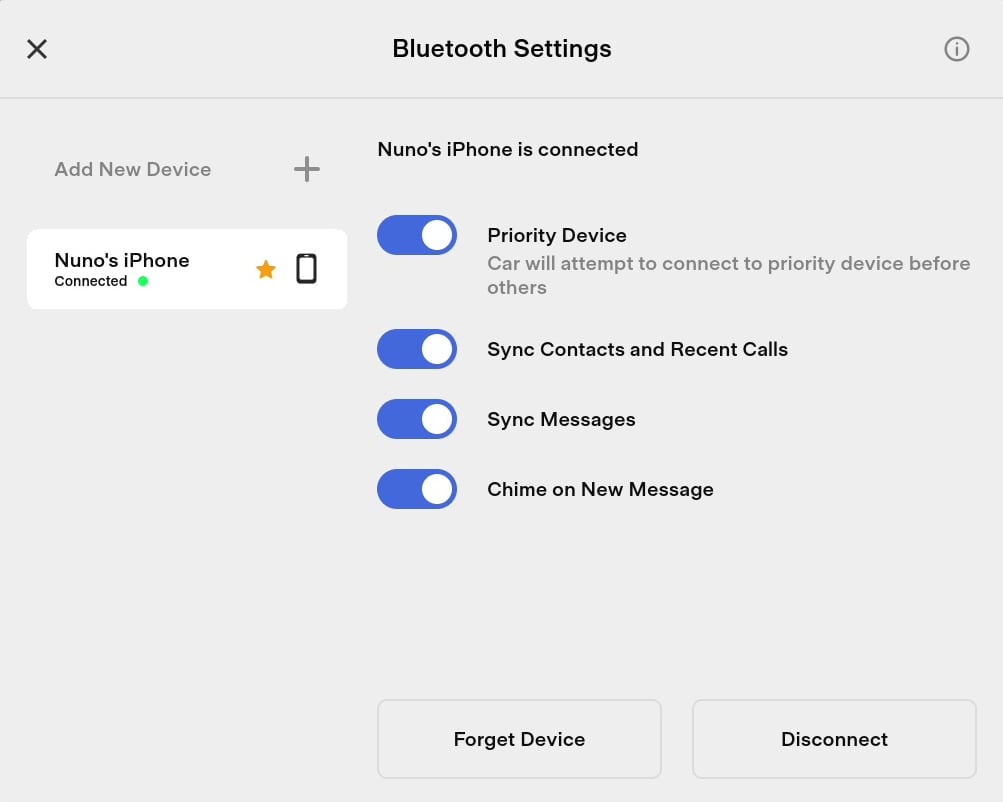
Teslas have the ability to send and receive text messages. Any message you receive while connected to the car will display the sender’s name on the screen. You can then have the car read the message to you or dismiss it.
Being able to receive text messages is as simple as pairing your phone and turning on a few settings. If you’d like to reply or send a text message, you can do it completely through your voice.
The only way to send a text message through your Tesla is using your voice.
If your phone is connected via Bluetooth and you have the sync messages option turned on, you’ll now receive an alert every time you receive a text message.
You’ll hear a ding and the alert will appear on the screen along with the sender’s name. The message will be obscured until you choose it to be shown and read.
If the car has a hard time recognizing a name in your phonebook, there are a couple things you can do. You can duplicate the contact on your phone, giving the second contact a name that the car will recognize. Alternatively, you can favorite the contact. By favoriting a contact you’ll be able to easily start a text message with them by going to Apps (the ^ icon ), Phone and then Favorites. Each favorite or contact has a Call icon next to their name along with a Message icon that you can use to start a new conversation.
If you have a Model 3 or Model Y, and you reply to someone, only to have the car not understand what you said, you can dictate your message again by pressing the right scroll wheel in twice. On a Model S or Model X, you have a selectable option to let you re-try dictating the message.
If the car is reading a long text message and you’d like to stop it, you can press the right scroll wheel two times to dismiss the message.
Although it would be a great feature, there is currently no way to adjust the volume at which text messages are read.
If you’re not receiving text messaging in the car you will want to confirm that your phone is paired and connected. You’ll also want to confirm that the ‘Sync Messages’ option is turned on in the car’s Bluetooth settings.
You’ll also want to check your phone’s Bluetooth settings to make sure the phone is sharing the relevant data with the car. You’ll want to go to Bluetooth settings and find your device which you’re connecting to, which is the car in this case. It should be labeled as Tesla followed by the model and the name of your car. Then you can tap on the ( i ) icon for iPhone’s or the gear icon for Android and you should see device specific settings. You will want to be sure that the car is sharing contacts and notification or text message data with the car.
If you’re still having trouble, you may want to try rebooting your car. If it still doesn’t work, you can try unpairing the phone and repairing it again. Delete the device from the car’s Bluetooth settings and also delete the car from your phone’s Bluetooth settings. You can then repair and enable text messaging again.
Keep in mind that sending group messages or replying to group messages is not currently supported on some devices, including iPhones.
Subscribe to our newsletter to stay up to date on the latest Tesla news, upcoming features and software updates.
For years, the Tesla Semi has existed in a state of pilot purgatory – a promising prototype tested by a handful of close partners, but rarely seen as a daily workhorse, regardless of the love drivers have for it. That is now finally beginning to shift, and quickly.
Through Tesla’s heavy-duty electric program, logistics giant DHL has officially taken delivery of its first Tesla Semi following a long trial period. Simultaneously, Keller Logistics Group, a regional service with a 300-truck fleet, has completed its own positive assessment of the vehicle.
These moves by a global titan and a family-owned carrier are signs that the Semi’s wait-and-see era is finally ending. Major fleets are moving from curiosity to integration, and that’s because data doesn’t lie.
The data points towards one thing, and that’s insane efficiency. During DHL’s two-week, 3,000-mile trial, the Semi didn’t just meet the industry standards; it simply shattered them.
While operating at average speeds of over 50 mph, the Semi achieved an efficiency rating of 1.72 kWh per mile. For context, the industry often budgets 2.0 kWh per mile or higher for Class 8 EVs like the Semi.
What’s important here is that it wasn’t an empty run. In one specific test, the Semi covered 390 miles on a single charge, while fully loaded with a gross combined weight of 75,000 lbs. This validates Tesla’s long-standing claim that the Semi can handle max-payload freight over long distances without compromising on range.
The DHL deployment also highlights some surprising operational flexibility. The Semi calls Central California home, where it is being tasked with routes averaging approximately 100 miles per day. Because the truck boasts a 500-mile range, this specific duty cycle allows DHL to operate for nearly an entire week without plugging in.
For DHL and other freight providers, this strategy is perfect. It eliminates daily charging downtime, reduces infrastructure requirements and strain, and maintains a substantial buffer for last-minute changes.
While DHL validates the tech on a global scale, the interest from Keller Logistics proves the Semi’s appeal isn’t limited to massive organizations. Keller is a family-owned carrier operating over 300 trucks in the Midwest and Southeast, and recently completed their own assessment to fit the Semi into their operations.
For a regional carrier where margins are tight, and every asset must perform, taking the time to pressure test, the Semi suggests that the ROI calculation for electric trucking is finally turning green.
As Jim Monkmeyer, President of Transportation at DHL Supply Chain North America, noted, the Semi "unlocks opportunities that were previously beyond the limits of heavy-duty EVs." With the data now public, the question for other fleets is no longer if the Semi works, but when they can get one.
The 2025 Holiday Update has officially been revealed, and while the headline feature is undeniably the integration of Grok into vehicle navigation, the real story is the sheer volume of wishlist items that Tesla has finally checked off.
From addressing minor quibbles and quality-of-life improvements to adding major new features, this Holiday Update includes a mix of both.
Grab your socks, because Santa Optimus will soon be delivering these features.
To view this video please enable JavaScript.
The biggest new feature for the 2025 Holiday Update is that Grok can now add and edit navigation destinations. You can now ask Grok to add a stop or change destinations. The best part? You can add multiple destinations in a single command.
To use this new functionality, you’ll need to ensure Grok’s in-vehicle personality is set to Assistant. Navigation Commands won’t work in Storyteller, Language Tutor, or other modes.
Given Grok is only available on AMD vehicles in the U.S. and Canada, we don’t expect this feature to be available to vehicles equipped with an Intel MCU, at least for the time being.
Unfortunately, we haven’t heard anything about Grok expanding outside of North America yet.
Each year, there are a lot of improvements for navigation and charging, and this year is no slouch either.
The navigation menu has been reorganized, and you can now reorder your favorites to whatever you like, rather than the default order of whatever came first. You can also now set Home and Work by dropping a pin on the map, rather than having to be in the location to set them.
Tesla now also shows suggested destinations based on your recent trips and habits while you’re parked, in a little extension to the UI below the navigation search bar. This appears to show a pair of recommended destinations, but the list can also scroll left and right to show more.
Tapping the navigation search will pop open the full list of recent and recommended destinations. We expect this feature to be available for all vehicles.
Tesla has added 3D views of certain Tesla Supercharger locations. When you’re looking at the Supercharger in the navigation menu, you can now tap “View Site Map” to see this 3D map.
When you’re navigating to the location, upon your arrival, the 3D site map will be displayed, showing a top-down 3D view of the site layout and live occupancy of each stall. We expect that you’ll be able to tap any location to park, allowing you to select a spot even out of view.
Given this is a 3D rendering, this one may only be available for AMD-equipped vehicles, but it’s less clear. Hopefully, Intel vehicles will also receive it, even if it doesn’t include the 3D Superchargers.
To view this video please enable JavaScript.
While Tesla already includes an option to use HOV lanes when navigating, it has been a manual setting. They’re now adding support for intelligent HOV routing based on HOV lane restrictions.
Routing will automatically select the HOV lane when your vehicle is eligible, based on time, location, passenger count, and local restrictions.
You will need to enable HOV lanes from Controls > Navigation > Use HOV Lanes. We expect this feature to be available for all vehicles, however, it may be limited by region.
You can now set a maximum charge limit for your current location. That means if you like to only charge to 50% at a certain location, or 100% at another, you can have that limit stick when you next arrive. No more forgetting to change the limit and having to check your app.
We expect this to be available for all vehicles.
The Dashcam Viewer has received another significant update. Clips from the Dashcam now display additional details directly in the Dashcam UI. Tesla displays a module on top of the dashcam video that displays the vehicle’s speed, gear, steering wheel angle, accelerator and brake pressure, and self-driving state.
That means we’ll no longer be guessing if a dashcam video we see on the internet involved the use of FSD, and we can accurately get the details of the situation.
Given that both Intel vehicles and the Cybertruck were recently updated to the new Dashcam Viewer, we expect this feature to be available for all vehicles.
A holiday wish finally came true. Your vehicle will now chime a few seconds after the doors close if a phone key is inside the cabin or a phone is left on the wireless charger and no occupants are detected.
This feature requires Ultra-wideband (UWB), which is available on 2024+ Model 3s, 2025+ Model Ys, 2021+ Model S and Model X vehicles, and all Cybertrucks.
Tesla has finally added the ability to turn off the phone toasters – the wireless phone charging pads in your vehicle. Musk suggested this was coming back in 2022. This was an often-requested feature from users whose phones would heat up and not charge. We have a whole wish list dedicated to improvements for Tesla’s wireless chargers, and this was one of them.
For Models S3XY, this can be done from Controls > Charging, and for the Cybertruck, from Controls > Outlets & Mods
Spotify also got a minor update with this release, which includes the ability to add new tracks from your search to your queue instead of changing what’s currently playing. Tesla is also adding the ability to scroll through large playlists without paging.
No Spotify Hi-Fi support quite yet, but we’ve got our fingers crossed for a future update. We expect the new UI to support all vehicles.
Tesla has added a fun new photobooth mode using the cabin camera. From Toybox > Photobooth, you can now take an in-vehicle selfie, slap some fun stickers on it, and then share it right from the Tesla App on your phone.
This feature will require vehicles equipped with a cabin camera and potentially an AMD processor.
Santa Mode has received a makeover, including festive snowmen, trees, a unique lock chime, and snow effects. It also looks like Santa Optimus and his presents are in every vehicle, rather than just the Cybertruck’s unique Santa Mode.
We expect this feature (or most of it) to be available to all vehicles. The parked visualization and falling snow might be simplified for older Intel vehicles.
Tesla currently displays elves for pedestrians, so it’ll be interesting to see where they choose to place snowmen and trees. Will they be placed randomly around the vehicle, or will they be placed when it detects trees and other obstacles?
A new light show has been added, Jingle Rush. Alongside that, some minor updates to light shows, including new color display effects, interior lighting controls, and longer light shows.
We’re looking forward to what the light show community gets up to with these new features.
Custom wraps and license plates have finally arrived for all vehicles models. Initially debuting on the Cybertruck in the 2024 Holiday Update, you can now personalize your vehicle with pre-loaded or custom wraps and license plates (using your glove box flash drive).
However, this isn’t just the Cybertruck feature becoming available on other models. Tesla is also adding the ability to tint your windows. Check out our guide on how to create your own custom wraps.
You can get wrapping at Toybox > Paint Shop. License plate options are available on the top tab.
This feature may be limited to AMD Ryzen vehicles.
Tesla has added another game, and you can now play astronaut from Arcade > SpaceX ISS Docking Simulator. You can control and guide your SpaceX Dragon pod towards the International Space Station with controls based on the actual interfaces used by NASA astronauts.
We expect this game to be available on AMD-equipped vehicles.
Light sync has gotten an update – you can now use rainbow colors rather than album-matched (or single-preset) colors during Rave Mode while parked. The accent lights will change along with the beats of your music.
This feature requires a vehicle equipped with interior ambient lighting.
The Tron Mode Light Cycle lock sound has been added as a default sound in the Lock Sounds list – a big wish from many since the release of Tron Mode.
You can check out even more lock sounds at our ever-expanding Lock Sound list here. This should be available to all vehicles.
Dog Mode is now available as a Live Activity for iOS users. A snapshow of your cabin interior will be sent to your phone periodically, along with updates on the interior temperature, vehicle state of charge, and exterior climate conditions.
The Live Activity will keep an updated photo of the interior of the vehicle, letting you keep an eye on your pooch directly from the lock screen.
The big omission in this year’s holiday update is CarPlay, which was rumored to be in development. There were rumors that CarPlay was getting mixed up with AirPlay, but it looks like we’re not receiving either feature, at least right now.
In our article, we speculated that CarPlay may be exclusive to the Robotaxi, which would make a lot of sense for non-Tesla owners using the taxi service. However, there’s still a chance Tesla could be actively working on CarPlay to be released in the future.
Tesla announced the features of the holiday update tonight. Tesla typically tries to get ahead of leaks, so tonight is likely the day wave 1 employees also start receiving the update. Wave 1 employees typically receive an update a few days to about a week before the general public.
We expect the holiday update to be version 2025.44.25, but that could change if any issues are found and need to be fixed. We expect the update to start rolling out to select users sometime next week.
There’s a lot packed into this update, but Tesla doesn’t always reveal every feature, so there may be more to discover when this update starts rolling out.
See all the features included in Tesla’s latest update, version 2025.44.3.
For years, the Tesla Semi has existed in a state of pilot purgatory – a promising prototype tested by a handful of close…
The 2025 Holiday Update has officially been revealed, and while the headline feature is undeniably the integration of Gr…
Tesla has quietly unlocked a capability that they announced was coming — the ability to text and drive. Or at least, som…
For North American Cybertruck owners, the charging situation has been a source of persistent frustration. While the truc…
Just days before the main events of Art Basel Miami Beach, Tesla has announced a surprise pop-up exhibition in the heart…
Thanks to one of our readers, it looks like we have a look at an upcoming change to Tesla’s power meter. The power me…
Take a look at features that Elon Musk has said will be coming soon.
How to Charge Charging is easy for anyone who has a garage or carport with electric service. I’ve been driving ele…
By Emergency Braking, I’m not talking about Tesla’s built in Collision Avoidance. This Emergency Brake can be used…
The user interface of Tesla vehicles includes an “About Your Tesla” menu which is accessed by tapping on the Tesla “T” i…
For years, the Tesla Semi has existed in a state of pilot purgatory – a promising prototype tested by a handful of close…
The 2025 Holiday Update has officially been revealed, and while the headline feature is undeniably the integration of Gr…
Tesla has quietly unlocked a capability that they announced was coming — the ability to text and drive. Or at least, som…
For North American Cybertruck owners, the charging situation has been a source of persistent frustration. While the truc…
Just days before the main events of Art Basel Miami Beach, Tesla has announced a surprise pop-up exhibition in the heart…
See all the features included in Tesla’s latest update, version 2025.44.3.
Subscribe to our weekly newsletter

How to Set Up Text Messaging – Not a Tesla App