On this page
The FedEx text message scam is a fake delivery notice sent by SMS or iMessage to people who ordered nothing, with a link that leads to a page built to collect card details, logins or a download. Do not tap the link, report the text, delete it, and check any real shipment on fedex.com by typing the tracking number yourself, on iPhone and on Android.
By Ugnius KiguolisPublished 10 min read
Facts checked October 31, 2026. Steps checked against Apple's and Google's current documentation and the reports we cite. We have not run the app or the link on a phone ourselves.
Do it yourself · free Remove FedEx text message scam yourself 8 steps, about 24 minutes, no software needed.
Facts checked on 31 October 2026 against the FTC phishing page, an FTC consumer alert and a Florida Attorney General alert (both seen as search summaries), FedEx's support page and Google's help page. No single address was tested because the subject is a type of text message.
Yes, a FedEx text about a parcel you never ordered, with a link to set up delivery or pay a fee, follows a known scam pattern. The FTC has warned that such a text is not from a delivery service, that no package exists, and that the page behind the link is not what it appears to be.
FedEx exists, ships billions of parcels, and can send real texts about shipments you know about. That is why the scam works: a real company name makes a fake message believable, and many people are waiting for something at any given time. The scammer does not need to know what you ordered. A message that fits a few people out of thousands is enough.
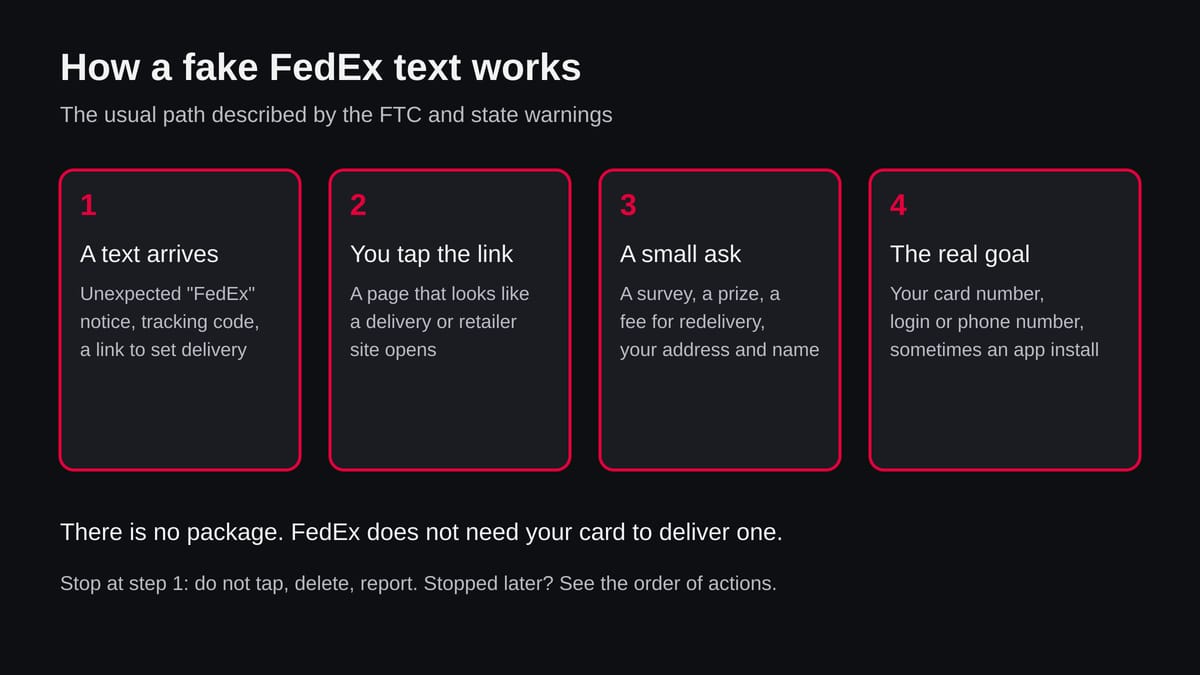
The FTC consumer alert, first published in February 2020, describes the text as a fake tracking notice with a link to schedule a delivery. The victim lands on a page styled as a retailer, is asked to finish a survey, is told that a prize has been won, and is then asked for a card number to cover shipping. The FTC summary is plain:
The Florida Attorney General has repeated the warning and reported FedEx's own advice to delete such texts and send them to its abuse address.
We wrote this guide because about a hundred people a month search for exactly this question with a security word in it, and because the answer is short but the steps afterwards are not. The rest of the page tells you what the message wants, how to recognise it, what to do on iPhone and on Android, and what to do if you already tapped, paid or installed something.
You received it because your phone number was on a list, not because your phone is infected. Scammers send the same text to huge ranges of numbers and wait for the few who are expecting a parcel.
Numbers reach such lists in several ways:
The public record does not tell us which route reached you, and we will not guess. It is also not a sign that FedEx lost your data. FedEx's name is used because it is known and trusted.
Replying, even with STOP, tells the sender that your number is active, so lists with confirmed numbers are worth more and the texts can increase. Report and delete instead. If the number keeps being used to message you, block it and let the phone's spam filter learn.
Do
Don't
This subject is a type of message, not one website, so we had no single address to test. We read the FTC's phishing and delivery scam pages, a Florida Attorney General warning that quotes FedEx, FedEx's support page and Google's help page for reporting spam.
FedEx text message scam · desk check · 31 October 2026
A documented scam pattern, no single address tested The scam pattern is documented by the FTC and a state attorney general. Whether your text is a scam is decided by the message itself: an unexpected one with a link is one.
The message is probably fake if you expect no parcel, if it carries a link to set delivery or pay a fee, if it hurries you, or if it offers a prize or survey. One sign is enough to stop and check on fedex.com.
You do not need to judge the wording. Scam texts are often written well now, and a perfect text proves nothing. Look at what the message asks you to do, not at how it sounds.
A carrier needs your address to deliver, and it already has it from the sender. It does not need your card number to deliver a parcel, and it does not give gifts for answering questions.
Look at the link as well. A real FedEx address ends in fedex.com.
Scammers use addresses that start with the word FedEx but end in some other domain, shortened links or long strings of letters. If you cannot tell, do not tap. Typing fedex.com yourself costs ten seconds.
What matters is how far you went. Reading costs nothing, a tap costs little, but a typed card, password or code needs action the same day.
You only read it
Do nothing risky. Report it and delete it. Nothing was sent anywhere.
You tapped the link
Close the tab. Do not enter anything. Check the browser downloads and, on Android, the notification shade for a file that was fetched. Update your phone and browser. The FTC page on phishing says that if you opened a link that may have installed malware, you should update your security software, run a scan and remove what it flags.
You typed card details
Call the bank on the number on the back of the card and ask to block the card and dispute any charge. Watch statements for several weeks. The FTC points to IdentityTheft.gov for the steps that match what you gave away.
You typed a password or a code
Change the password of that account from another device you trust, and everywhere you used the same one. Turn on two-step sign-in. If you read out a code, sign out of all sessions of that account.
You gave your phone number or address
Expect more scam texts and calls. Do not confirm anything to unknown callers. Your bank or FedEx will not ask for a code by phone.
You installed an app or profile
Remove it using the steps in the plan below, then check the rest of your accounts as in the cases above.
There is nothing to remove for a text you only received.
You report and delete the message, and you check the places a link could have changed on your phone.
Leave the link alone and do not answer, not even with STOP. A reply tells the sender that the number is live.
If you want to know whether a parcel exists, open fedex.com in your browser or the FedEx app and enter the tracking number from your shop.
The text is the only thing you have to deal with at this point, and it is harmless if left unopened.
In Google Messages, touch and hold the conversation, tap Block, then Report spam and OK; or open the chat and tap More options > Details > Block & report spam.
Google's help page says the sender's number and the last 10 incoming messages are sent to Google, and that the sender cannot see the report. You can also forward the text to 7726 (SPAM).
On iOS 26, a message from an unknown sender shows Report Junk under it. Tap it and choose to delete and report. You can also forward the text to 7726 and report it at ReportFraud.ftc.gov.
Apple's page that we opened did not cover this, so the menu names are our reading of iOS 26; if you do not see the link, press and hold the message, delete it and block the sender from the conversation's contact details.
On iPhone open Settings > Messages and turn on Filter Unknown Senders so that texts from numbers outside your contacts go to a separate list.
On Android open Google Messages, tap your profile picture > Messages settings > Spam protection and turn on Enable spam protection. Menu names may differ by version and phone make; this is our reading, not a tested path.
Close the tab and enter nothing. On iPhone, open Settings > General > VPN & Device Management and look for a profile you did not install; remove it if you find one.
On Android, check Settings > Apps for an app you do not remember, and open Google Play > profile picture > Play Protect to run a scan. Keep iOS or Android and the browser updated.
On Android, touch and hold the icon and choose Uninstall, or use Settings > Apps. If Uninstall is greyed out, search Settings for Device admin apps and switch the app off first.
On iPhone touch and hold the icon and choose Remove App. Then switch off Install unknown apps for the browser and messages on Android, and change the passwords you used since.
Call your bank on the number on the back of the card, block the card and dispute any charge. Change the password from another device, on every site where it was used, and turn on two-step sign-in.
In the United States, the FTC points to IdentityTheft.gov for the steps that fit what you gave away. Watch statements for several weeks.
No app is needed to remove a text message. A page or app that offers to clean your phone of the FedEx scam is selling something, and some such offers are scams themselves.
The free steps above are all that Google and the FTC ask for.
Open fedex.com or the FedEx app yourself and enter the tracking number. Never use the link in the text to check it.
Do you expect a parcel
Think of orders and returns in the last two weeks. If you ordered something, your shop emailed or showed a tracking number in your account. That number, not the text, is your start.
Type the address yourself
Open the browser, type fedex.com, and use the tracking box. Or open the FedEx app from your phone's store. Do not search for the carrier through an ad.
If nothing is found
A text with no real tracking number is not about a shipment of yours. Call FedEx on 1.800.GoFedEx (1.800.463.3339), the number shown on fedex.com, if you want to be sure. Do not call a number printed in the text.
Report it twice: to your phone's spam system and to the authorities. It takes a minute and helps filters block the next copy.
Report it twice: to your phone's spam system and to the authorities. It takes a minute and helps filters block the next copy.
Yes, the FedEx text message that you did not expect is a known scam pattern. The FTC has warned that a text about a package you never ordered, with a link to set up delivery, is not from a delivery service and that no package exists.
FedEx, as quoted in a Florida Attorney General alert, tells people to delete such texts and report them to its abuse address. Texts that really come from FedEx are about shipments you know about, and you can always check them by typing the tracking number on fedex.com yourself.
Tapping the link by itself usually shows you a web page and nothing more, but that page is where the scam works. The FTC describes pages that look like a delivery or retailer site and lead to a survey, a prize and a request for card details to pay shipping.
So close the page, enter nothing, and check whether anything was downloaded. If you typed a card number, a password or a code, treat that as the real problem and follow the steps for it below. A tap alone does not prove that your phone is infected, and we cannot see your phone.
Do not reply, not even with STOP, and do not tap any link. On Android, open the message in Google Messages, tap More options, then Details, then Block and report spam.
On iPhone, tap Report Junk under a message from an unknown sender if it is shown, then delete it. You can also forward the text to 7726 (SPAM), which the FTC names for reporting phishing texts, and report it at ReportFraud.ftc.gov. Then delete the message and block the number.
FedEx can send real texts, but only about shipments you know about, for example when you gave your number for delivery updates or asked for a notice. A real notice does not ask for your card number, a prize survey or a login on a page that is not fedex.com.
The safe test never uses the link in the message. Open fedex.com or the FedEx app yourself, enter the tracking number, and see what it says. If there is no such number or no such shipment, the text is not about you.
Scammers send texts to very large lists of numbers and hope that some of the people receiving them are waiting for a parcel. Phone numbers can be guessed in bulk, bought from earlier leaks or taken from other scams.
Getting the text does not mean your phone is hacked or that FedEx lost your data. It means your number is on a list. Our check could not show where this list came from, and nobody outside the sender can say it for a single text.
It can, if you act on the message. The FTC describes pages that ask for card details to pay a small shipping fee, and the money and the card number go to the scammers.
A bank can often block a card and reverse charges if you call quickly, so call the number on the back of the card. Contact your bank, change passwords that you reused, and watch statements for several weeks, because card numbers are often used in small test charges first.
No. There is nothing to remove for a text that you only received or read. It is not a program on your phone. What you may need to remove is what the link led to, such as an app you installed, a configuration profile on an iPhone, or a browser notification permission.
The steps below show where to look on iPhone and Android. Any app or page that sells a FedEx scam remover is using the name to sell you something.
Different names, the same scheme. The FTC has seen fake tracking texts that use FedEx, UPS, USPS and Amazon names alike, and the stories vary:
The message may use your name, or only a number. The safe response is the same for all of them:
Call 1.800.GoFedEx (1.800.463.3339), the support number on fedex.com, or use the contact page of the site that you type in yourself. For reporting a scam, the abuse address quoted in the Florida Attorney General alert is [email protected].
Do not use any phone number or address that appears inside the suspicious text. In the United States you can also report at ReportFraud.ftc.gov; outside it, report to your national consumer or cyber authority.
About the author
Ugnius Kiguolis
Owner and editor of 2-spyware.com
Ugnius Kiguolis owns and edits 2-spyware.com. He is responsible for the site's Windows security guides: what each threat does, how to remove it and how to get files and settings back. Every guide he signs is checked against current vendor, law-enforcement and Microsoft sources before it is published and again when the facts change.
More guides by Ugnius Kiguolis
Still seeing it, or found something we did not cover? Ask here: members and our editors answer. Reading is open; writing needs a free account.
Log in to comment
…

FedEx text message scam on iPhone and Android: is it real and what to do – 2-Spyware