That loud, jarring alert that went off on millions of phones across India on May 2, 2026 left a lot of people confused, startled, and frankly a bit annoyed. The screen lit up with “Extremely Severe Alert” in bold red, the phone buzzed aggressively, and it overrode everything including silent mode. So what exactly is going on here? How does your phone receive this, and does it even need a SIM card to do so?
Let’s break it all down.
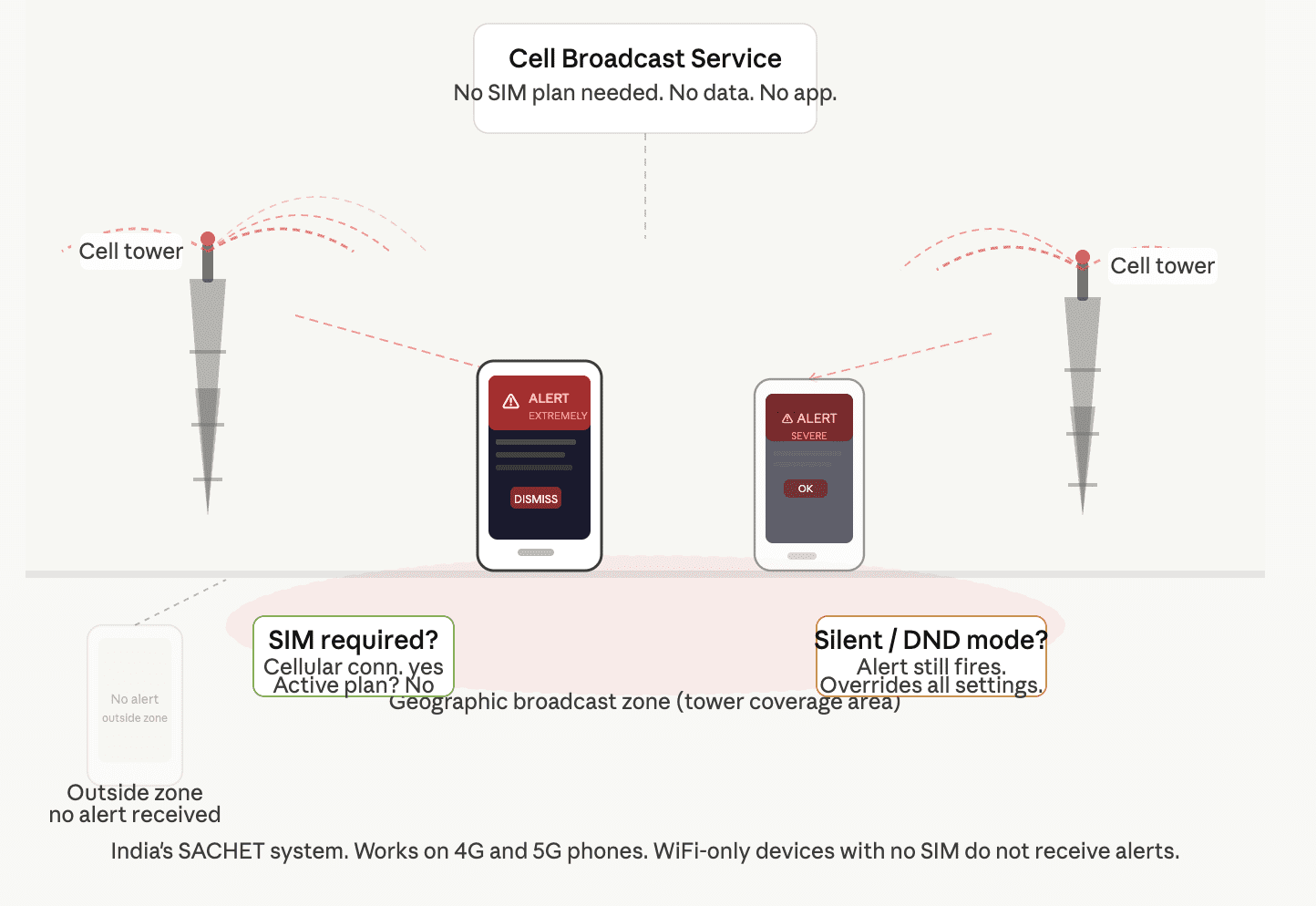
The system behind these alerts is called Cell Broadcast Service (CBS). Think of it less like a text message and more like a radio tower broadcasting a signal to every device in range simultaneously.
It is a government-supported technology that allows authorities to send instant alerts to all mobile phones in a specific area. Unlike SMS or messaging apps, it does not rely on individual phone numbers. Instead, it uses nearby mobile towers to broadcast messages directly to devices.
In India, this system operates under a platform called SACHET (System for Advanced Communications and High-quality Emergency Transmissions). Developed by the Centre for Development of Telematics (C-DOT), the SACHET system is based on the Common Alerting Protocol (CAP), as recommended by the International Telecommunication Union, and is currently operational across all 36 States and Union Territories of India.
This is where most people get confused. A regular SMS travels to your specific number, through your carrier’s message centre, one by one. Cell Broadcast is nothing like that.
While SMS messages travel through the network’s Message Service Center and queue up individually for each recipient, CBS works more like a radio broadcast.
The practical difference? During a disaster, when every person in a city is simultaneously trying to call, text, and search for news, the SMS network collapses under the load. Cell broadcasts don’t clog up the network. They’re sent on a separate channel.
Here’s a quick comparison:
The alert is broadcast to all mobile devices within a geographic cell (tower area) simultaneously, targeted to people physically in the affected zone, unlike SMS which is account/number based.
So if you’re visiting Chennai during a cyclone warning meant for coastal areas, your phone gets the alert because you’re physically present there. Your family member sitting in Pune? Nothing. Location-based, not number-based. That’s the key distinction.
The technology is designed to override network congestion, as well as user-defined silent or do-not-disturb settings, so that critical alerts are heard during emergencies.
Short answer: you need a cellular connection, not necessarily an active SIM with a paid plan.
Phones that are turned on, but without an active account or subscriber SIM card can still receive alerts.
That said, “no SIM at all” is a different story. You will not receive alerts if your device is turned off, connected to a 2G or 3G network, WiFi only, or not compatible.
So a phone running purely on WiFi with no SIM inserted will not receive the Cell Broadcast alert. It needs to be connected to a 4G or 5G cellular tower. A phone with an inactive SIM or a SIM without an active data plan can still receive alerts, because the alert comes through the tower signal, not through your billing account.
To strengthen alert dissemination in time-critical situations such as tsunamis, earthquakes, lightning strikes and man-made emergencies like gas leaks or chemical hazards, Cell Broadcast technology has been introduced alongside SMS.
India’s SACHET system has already been put to work in real situations. Odisha and Andhra Pradesh successfully used the system during cyclones Fani (2019) and Amphan (2020), potentially saving thousands of lives.
Technically yes, but think twice before doing so.
Most smartphones allow users to manage alert settings. Go to Settings, then Notifications, then Emergency Alerts or Cell Broadcast.
On Android phones specifically, the path is: Settings > Notifications > Wireless Emergency Alerts. From there you can control sound, vibration, and alert types. On iPhones, go to Settings > Notifications and scroll to the bottom for Emergency Alerts and Public Safety Alerts.
Turning off genuine disaster alerts is not a great idea, but the option exists if you find the test alerts disruptive.
From the latest iPhone to a basic feature phone, if it can connect to a cellular network, it can receive these alerts.
The catch is that your phone must support 4G LTE or 5G connectivity. Older 2G or 3G devices won’t receive Cell Broadcast alerts in India’s current implementation. Most smartphones launched in the last four years in India are 4G or 5G capable, so the majority of people are already covered.
If your phone is on the older side or you want to upgrade to a fully compatible device, here are some well-rated options available on Amazon.in:
Budget Pick: Samsung Galaxy M15 5G with a 6000mAh battery, Super AMOLED display, and 5G support
Mid-Range Pick: Samsung Galaxy M36 5G with Gorilla Glass Victus+ and 50MP OIS camera
On May 3, 2026, smartphones across India received a pan-India emergency alert test using Cell Broadcast Technology through the SACHET system, the first test on such a national scale. A sharp beeping sound with vibrations and a pop-up message labelled “Extremely Severe Alert” appeared in multiple languages including English, Hindi, and regional languages.
The Ministry of Communications had said in a press release on April 29 that pan-India testing of the cell broadcasting system was being carried out, and that mobile phone users could receive test messages.
The scale of it caught many people off guard. That’s actually the point. A system that only works when you’re expecting it isn’t really a reliable emergency system.
The Emergency Broadcast System on your phone uses Cell Broadcast technology, which sends alerts through mobile towers to every compatible device in a given geographic area. No app downloads, no registration, no data connection needed. Just a 4G or 5G cellular connection.
You don’t need an active paid plan to receive alerts, but you do need a SIM inserted and a working tower connection. Pure WiFi devices with no SIM won’t get them.
It’s one of those features built into your phone that you’ll hopefully never need in a real emergency. But knowing how it works means you won’t panic the next time your phone screams at you in the middle of a quiet morning.

How Does the Emergency Broadcast System Work on Your Phone? And Do You Need a SIM? – gogi.in