


Learn about our contributor guidelines, process, and timeline.
A collection of the best tech news and content.
Define tech jargon and acronyms with our comprehensive glossary.
Watch vendors read Bad G2 Reviews, à la Mean Tweets.
May 6, 2026
 by Bhoomika Pawar
As a digital marketer, I’ve always found email marketing to be one of the trickiest yet most rewarding channels to get right.
I have spent most of my career focused on SEO, optimizing keywords and tracking rankings, but I recently explored a different side of marketing by evaluating the best email marketing software using G2 reviews and performance data. Some tools seemed straightforward on paper, while others revealed more complexity through real user feedback.
Whether you’re a small business sending newsletters, a startup looking for affordable tools with automation, or an agency needing CRM integrations, this guide covers it all. The 10 tools I evaluated include Constant Contact, Brevo Marketing Platform, Intuit Mailchimp, Instantly, lemlist, Systeme.io, GetResponse, Pipedrive, Dotdigital, and Sender.net, each suited for different team sizes, budgets, and campaign needs.
Based on the insights, I have broken down each tool’s strengths, limitations, and ideal use cases to help you choose the right fit with confidence.
*These email marketing software are top-rated in their category, according to G2’s Spring 2026 Grid Reports. I have included pricing information for the email marketing platforms that publicly share their pricing plans.
When I started using email marketing tools, it was mainly to avoid the chaos of managing campaigns manually. Writing emails was one thing, but keeping track of lists, scheduling sends, and measuring performance quickly became too much to handle without the right system in place.
That shift is reflected in the market as well. The global email marketing software market is projected to grow to $4.27 billion by 2034, at a CAGR of 10.6%. North America alone accounted for 33.9% of the market in 2025, underscoring the widespread reliance of businesses on these platforms.
At a basic level, email marketing software helps teams create, send, and track campaigns more efficiently. But the real value comes from features like automation workflows, audience segmentation, A/B testing, and integrations with CRM or ecommerce platforms.
Tools that streamline automation and targeting tend to make the biggest impact. Instead of managing one-off campaigns, teams can build consistent, data-driven communication that scales with their audience while reducing manual effort.
To build this list, I analyzed top-rated platforms in G2’s Email Marketing category and looked closely at how verified users describe them across ratings, Grid placements, and in-depth reviews. Instead of relying only on overall scores, I used AI-assisted review analysis to uncover consistent patterns around ease of use, automation capabilities, segmentation, deliverability, integrations, and pricing.
Because email marketing tools serve very different use cases, from small businesses running simple campaigns to enterprises managing complex customer journeys, I focused on practical factors that impact day-to-day execution. This included how easy it is to create and scale campaigns, set up automation workflows, manage subscriber lists, personalize emails, and track performance through analytics.
I also prioritized recurring reviewer feedback, both positive and critical, to separate marketing claims from actual user experience.
Screenshots included are vendor-provided G2 images or publicly available UI visuals and do not imply direct hands-on testing.
Through all the testing, I kept one question in mind: “Does this tool make email marketing simpler, smarter, and more impactful?” These are some of the important factors I considered while evaluating these email marketing tools:
Whether you’re running a small business, managing campaigns for a larger organization, or just getting started with email marketing, these ten tools are worth exploring.
The list below contains genuine user reviews of email marketing software. It’s important to note that vendors offering a free trial are also considered free in this context.
To be included in this category, a solution must:
*This data was pulled from G2 in 2026. Some reviews may have been edited for clarity.
If you’re wondering what the best email service is for newsletters, Constant Contact consistently came up as a reliable, easy starting point during my evaluation of G2 reviews. Across hundreds of user reviews, the simple, beginner-friendly interface is one of the most frequently praised qualities, and that aligns with G2’s 87% ease-of-use score. Reviewers highlight features like the content assistant, guided setup, and pre-built layouts as key reasons the platform makes it easy to start sending campaigns without getting lost in menus or settings.
Beyond building emails, Constant Contact proves genuinely useful for managing full campaigns end-to-end based on what G2 reviewers consistently report. The library of customizable templates helps speed up design work, and with solid list-management capabilities rated 86% on G2 for managing email lists, it’s easy to keep contacts organized as you grow. Reviewers consistently mention how quick and professional the templates look, even for teams without a dedicated designer.
Integrations with social platforms and CRMs cover most small-business workflows, making it easier to manage campaigns without constantly switching platforms. G2 reviewers also call out the social media publishing tools as a strength; teams can schedule and manage posts across multiple platforms from the same dashboard, which several users describe as a genuine time-saver for lean marketing operations.
The automation tools, while not as advanced as enterprise-level platforms, handle everyday workflows like onboarding journeys, event reminders, and re-engagement sequences with minimal ongoing effort.
The email and mobile preview capabilities give teams confidence that campaigns will render correctly across different inboxes and devices. G2 rates email and mobile preview at 88%, and reviewers mention how helpful it is to catch formatting issues before sending, especially since most subscribers open emails on their phones. For teams without dedicated QA resources, this built-in preview step prevents embarrassing layout problems and saves time on back-and-forth revisions.
Constant Contact makes audience segmentation and targeting practical, even for non-technical marketers. G2 users appreciate how easy it is to group contacts by demographics, behavior, or engagement level, and the retargeting features help boost conversion rates without adding workload. With the platform scoring 88% for ease of admin, teams can keep campaigns running smoothly even with limited resources.
Customer support is another area where Constant Contact holds up well. G2 rates the quality of support at 85%, and reviewers consistently mention how responsive and helpful the team is when questions come up during setup or troubleshooting, a reassuring safety net for small businesses and first-time email marketers.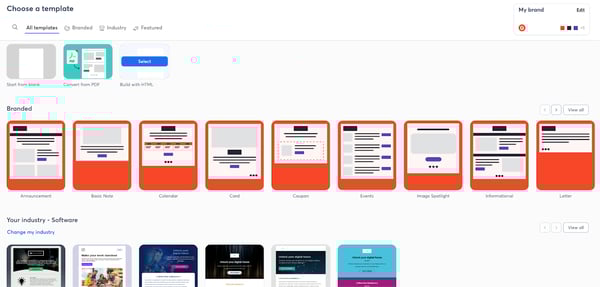
Constant Contact offers polished templates that make it easy to get campaigns up and running quickly. However, customization is more limited compared to some of the advanced tools on the market, so teams wanting highly tailored layouts or deeper design control may feel constrained. For small businesses and beginners who prefer simplicity and ready-made designs, this won’t be a hurdle, but marketers who rely heavily on fine-tuned branding might look for more flexibility.
Another area G2 users mention is that its more advanced features, especially around complex automation and detailed analytics, could be stronger. While Constant Contact handles the basics well, marketers who rely heavily on granular reporting or more sophisticated multi-step journeys may feel constrained. Still, for teams running straightforward campaigns or early automations, the simplicity keeps things manageable and reduces the learning curve.
Overall, Constant Contact is a dependable, beginner-friendly platform that makes launching email campaigns simple and manageable, especially for small businesses that value ease of use and quick setup over heavy customization.
“The easy-to-use templates are a great feature that cuts down on time. Also, the fact that it gives us real-time information on open rates, etc.”
– Constant Contact review, Jaime S.
“Formatting can be a bit wonky when starting a new project; being able to save templates helps a lot.”
– Constant Contact review, Angel S.
Email marketing helps you engage your audience, but it all starts with collecting the right contacts. Check out the best online form builders to design signup forms that grow your email list faster.
Brevo Marketing Platform earns strong marks for its seamless onboarding, no credit card required, reasonable pricing, and a quick path to the first campaign. Similar to Mailchimp, the drag-and-drop editor comes in very handy when creating campaigns, and reviewers frequently call out the reusable templates as a huge time-saver. You can tweak them to match your brand’s style and reuse them across multiple campaigns without starting from scratch.
What stands out from G2 reviews is how well Brevo balances its all-in-one approach without feeling overcrowded. The platform includes email, SMS, WhatsApp, segmentation, and basic CRM functions in one place, and most users say this setup makes day-to-day work much smoother. According to G2, Brevo maintains a strong ease-of-use score of 91%, and reviewers confirm that the interface feels intuitive, especially when setting up simple automations or checking campaign performance.
The API integrations deserve a special mention. G2 reviewers describe the API as easy to work with, and users frequently mention automating workflows reliably through it. With G2 rating integration APIs at 82%, reviewers also highlight how solid the core email features are, from list management to deliverability controls, a consistent theme across recent feedback.
Brevo’s pricing model is another differentiator worth noting. Unlike many competitors that charge based on the number of contacts, Brevo charges per email sent, which makes the platform more scalable for businesses that maintain large subscriber lists but send targeted campaigns. Several reviewers on G2 appreciate this structure because it keeps costs predictable as the database grows.
The automation workflow builder is surprisingly powerful for its price point. Setting up automated customer journeys like welcome sequences or abandoned cart reminders is straightforward and doesn’t require a developer. G2 users rate automated email responses at 86%, and the drag-and-drop journey builder makes it approachable even for teams without technical resources.
Deliverability is a strong suit here. Emails consistently land in inboxes, and the platform provides solid controls for managing sender reputation, domain authentication, and bounce handling. G2 rates managing email deliverability at 90%, which aligns with what reviewers repeatedly highlight as one of Brevo’s most dependable qualities.
The performance dashboard and campaign tracking are clean and easy to read. G2 reviewers find it straightforward to monitor open rates, clicks, and audience engagement without getting buried in data. G2 scores basic reporting at 88%, and users appreciate that the analytics surface what matters without overcomplicating things.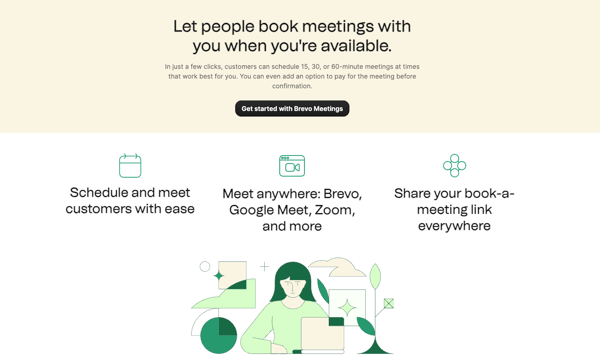
The free plan is helpful for testing and early-stage growth, but the daily email limit can feel restrictive if your campaigns require more volume. Several G2 users pointed out that once you hit the 300-per-day cap, you’ll likely need to upgrade to keep momentum, making the free tier better suited for small newsletters or early-stage businesses experimenting with email marketing.
The mobile version of the platform is another area with room for improvement. It’s functional and covers the essentials, but reviewers frequently mentioned slower responsiveness and a less polished interface on mobile browsers. For users who prefer managing campaigns on the go, these limits may feel noticeable, though the desktop version remains smooth, reliable, and much better suited for daily campaign operations.
Overall, Brevo remains a strong choice for small businesses and growing teams that want simple, efficient email and SMS marketing under one roof.
“It’s very easy to work with the tools it provides. They let you add images, videos, and clickable buttons, which helps us collect data more effectively.”
– Brevo Marketing Platform review, Bea A.
“Limited tracking with Brevo SDKs, you must do API integration, I believe it’s because of cybersecurity and some.”
– Brevo Marketing Platform review, Atilla K.
Check out how you can use email automation features to simplify business processes.
Intuit Mailchimp Email Marketing is one of the most established names in email marketing, and based on my evaluation of G2 reviews, the software has only improved over the years, especially on the automation side. According to G2 Data, Mailchimp scores 89% for ease of use, and reviewers consistently note how quickly they can set up automated sequences to welcome new subscribers, re-engage inactive users, or send time-based follow-ups.
One area where Mailchimp consistently earns praise is its flexibility in audience management. G2 reviewers describe how easy it is to group contacts by purchase history, location, or engagement level for everyday campaign targeting. With G2 ratings showing 89% for building and personalizing emails, users clearly rely on these tools to deliver more relevant outreach without needing a data specialist to set things up.
The reporting dashboard is refreshingly clear. G2 reviewers describe the performance metrics as easy to interpret, including click maps and engagement trends, which makes it straightforward to tweak campaigns on the fly. G2 rates basic reporting at 88%, and reviewers frequently mention how the analytics help them understand which campaigns resonate and which ones need adjustment.
If you run a shop, Mailchimp works as a strong email marketing platform for e-commerce businesses. The platform’s ecommerce and CRM integrations both score 84% on G2 and plug directly into workflows like abandoned cart recovery or product recommendations, making it a natural fit for online retail.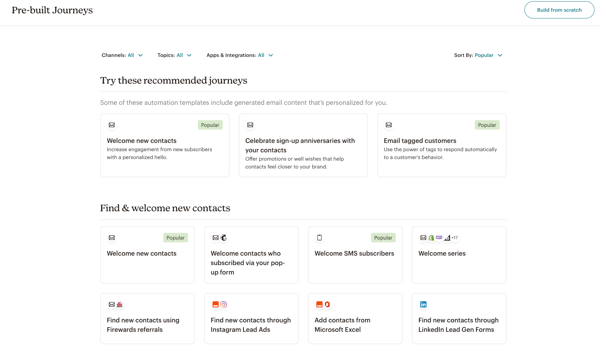
Template creation and brand consistency are well-handled here. G2 reviewers appreciate being able to create and save reusable templates with pre-loaded colors, fonts, and logos, so every email matches the brand without starting from scratch. The drag-and-drop editor supports quick customization, and the mobile preview feature ensures everything renders well across devices.
Mailchimp offers a solid free starting point for small businesses just getting into email marketing. The free plan allows early-stage teams to explore the platform, build audiences, and send initial campaigns without upfront costs, which several reviewers highlight as a strong entry point for beginners testing the waters.
Support quality has improved over time, and G2 users rate it at 83%. Reviewers mention that the chat support is responsive and detailed, and the platform’s onboarding flow, from account creation to first campaign, is guided step by step, making the learning curve manageable even for teams with limited email marketing experience.
Mailchimp’s pricing is one area to keep in mind as your audience grows. Costs increase as you unlock more advanced features or expand your subscriber list, so very early-stage businesses or teams on tighter budgets may want to keep a closer eye on plan limits. But for growing ecommerce brands or agencies running frequent, automated campaigns, the breadth of built-in tools usually makes the pricing worthwhile.
List management is another aspect reviewers mention. Mailchimp handles everyday segmentation well, but managing larger or more complex lists can take extra steps, especially if you’re working with many sub-segments or building layered audience rules. Teams with straightforward lists won’t feel this friction, but marketers who depend heavily on advanced segmentation or intricate data models may find more specialized tools a better match.
Overall, Mailchimp remains a reliable, scalable choice for teams that want strong automation, clean design tools, and seamless integrations, all in a platform that’s easy to grow with.
“I like most its automation and embedded forms that could be added to the website.”
– Intuit Mailchimp Email Marketing review, Michael M.
“It tends to get expensive pretty quickly. There used to be a free plan that was simple to get people started. Additionally, the email builder is not as simple to use nor as robust as others on the market.“
– Intuit Mailchimp Email Marketing review, Charles J.
Great email campaigns start with great copy. Check out the best AI writing generators to create engaging subject lines and email content faster.
When it comes to cold email outreach, Instantly is one platform that G2 reviewers consistently rave about. It stands out because it makes cold email outreach feel deceptively simple while still delivering the kind of power normally reserved for more complex platforms. What comes through strongly in reviews is how fast teams can get campaigns up and running.
The interface feels intentionally designed so both newcomers and seasoned outreach teams can jump straight into sending. According to G2 Data, Instantly scores 95% for ease of use, which tracks perfectly with how reviewers describe the effortless campaign setup and list management experience.
Where Instantly really shines is in deliverability and sending performance, two things cold outreach absolutely depends on. The built-in warm-up engine, inbox rotation, and domain health features handle the heavy lifting behind the scenes. Many reviewers note that their emails consistently reach inboxes at scale, and the platform’s 97% rating for outbound email on G2 backs that up.
The reporting deserves credit. Even though Instantly keeps the analytics clean and actionable, you get detailed visibility into open rates, replies, and performance trends that help you iterate quickly. G2 rates A/B testing at 93% and basic reporting at 93%, which reflects how well the platform supports rapid campaign optimization without burying you in unnecessary data.
Another advantage is scalability. Managing multiple domains, rotating inboxes, and automating follow-ups becomes almost automatic once you understand the workflow. G2 reviewers rate Instantly at 95% for managing email deliverability, which reflects how well the platform helps maintain sender health even when volume increases. Whether you’re running a single campaign or managing outreach for several clients, Instantly handles the operational complexity so you don’t have to.
Support is consistently praised by G2 users, who rate it at 97% for quality. Reviewers describe the team as fast, helpful, and genuinely invested in resolving issues, whether it’s warm-up configuration, sequence rules, or deliverability troubleshooting. For teams running time-sensitive outbound campaigns, this responsiveness is a critical factor.
The data import and export tools make it easy to move lead lists in and out of the platform without friction. G2 rates data import and export at 94%, and reviewers appreciate how straightforward it is to upload contacts, map fields, and get campaigns running without technical bottlenecks.
Instantly also nails ease of setup. G2 scores it at 94%, and users consistently mention that getting from sign-up to first campaign takes very little time. The onboarding is lean, the workflow is intuitive, and the platform doesn’t force you through unnecessary steps before you can start sending, a real advantage for fast-moving outbound teams.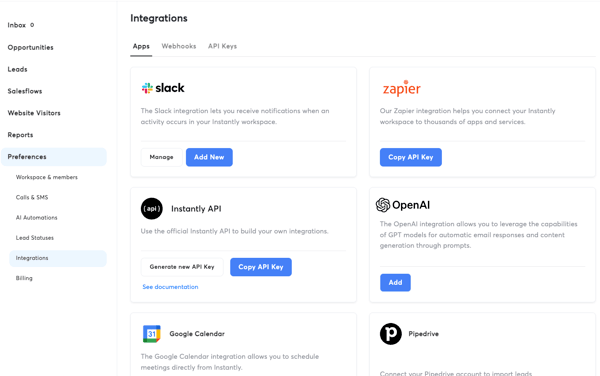
It handles basic checks well, but it isn’t meant to replace a full standalone verifier. For companies sourcing large volumes of leads from scraped lists, pairing Instantly with a dedicated verifier will give more reliable accuracy. But for outreach teams using pre-qualified leads or fresh B2B datasets, the native verification is generally enough to keep campaigns running smoothly.
Some campaign settings require a bit of discovery before teams can fully optimize their workflow. G2 reviewers mention that features like slow ramp defaults, campaign limits, and account-level caps reset on different schedules, which isn’t always explained upfront. Once teams understand the logic, everything runs predictably, but the initial configuration benefits from patience and a willingness to explore the platform’s documentation or lean on support.
Instantly is the strongest pick for sales teams, agencies, and outbound-focused marketers who need cold email at scale with best-in-class deliverability. If your priority is speed, inbox placement, and reliable sending infrastructure, Instantly delivers exactly that.
“Warmup actually works. Connected two domains, let them run, and deliverability held once campaigns went live. The UI is clean. Sequences, scheduling, and account limits are all where you’d expect them without digging around. For a small operation doing targeted outbound, the core product does its job.”
– Instantly review, Vatsalya B.
“What I dislike most is that domains purchased through Instantly do not feel fully under my control, while connecting domains I buy elsewhere seems more complicated than simply buying them inside the platform. I also find mailbox performance too unpredictable. Sometimes accounts seem properly warmed up and set up according to the instructions, but later, something still goes wrong without a clear explanation. When managing a large number of mailboxes, I need the system to be reliable and predictable, because I do not have time to constantly investigate technical details. There have also been cases where mailboxes had to be replaced, which makes planning harder and creates uncertainty.”
– Instantly review, Konstantīns S.
New to creating newsletters? Check out this guide to creating a newsletter that stands out.
lemlist earned its spot on this list for seamlessly blending email, LinkedIn, and calling into a single outreach workflow. What stands out across G2 reviews is the platform’s deep focus on personalization, not just merge tags, but dynamic images, custom variables, and AI-generated icebreakers that make cold messages feel genuinely tailored. G2 users back this up, with the platform scoring 91% for ease of use and 96% for product direction, suggesting the team is building exactly what outreach professionals need.
The multichannel sequencing is lemlist’s biggest differentiator. You can build campaigns that combine email steps, LinkedIn profile visits, connection requests, and manual call reminders all within one flow. G2 rates sending outbound emails at 94%, and reviewers consistently mention that having email and LinkedIn in one place removes the need for separate tools and keeps prospecting organized.
The built-in lead database and email finder save significant prospecting time. With access to a 600M+ contact database, enrichment, and verification built into the workflow, teams can go from list building to sending without switching tools. G2 users rate the platform at 91% for managing email lists, and reviewers highlight how quickly they can identify and reach decision-makers.
Deliverability is well-handled through lemwarm, lemlist’s built-in warm-up tool that comes included with every paid plan. It automates sender reputation building and helps keep emails out of spam folders. G2 rates managing email deliverability at 93%, which aligns with reviewers who report consistently strong open and inbox placement rates.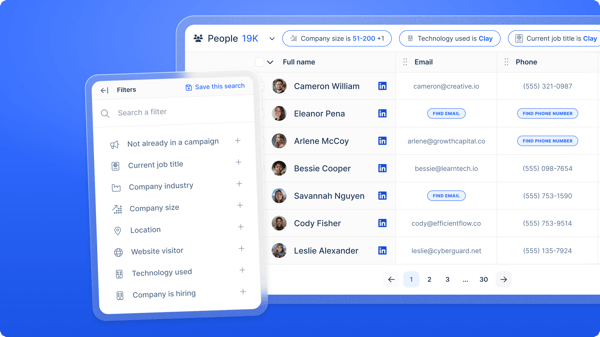
The AI-powered personalization features go beyond standard merge fields. lemlist lets you generate custom icebreakers, personalized images, and dynamic landing pages that adapt per recipient. Reviewers say this level of personalization noticeably improves reply rates and makes outreach feel less automated and more human, especially valuable for B2B teams targeting mid-market accounts.
Campaign tracking and performance visibility are clear and actionable. The sequence-level reporting shows exactly which steps are driving engagement, and G2 rates A/B testing at 87% and basic reporting at 89%. Reviewers appreciate how easy it is to see what’s working and iterate quickly without digging through complex analytics.
Customer support and platform updates are frequently praised. G2 rates quality of support at 92%, and reviewers mention that the team is responsive, knowledgeable, and genuinely invested in resolving issues fast. Multiple users also highlight how frequently lemlist ships new features, which builds confidence that the platform will keep improving.
lemlist’s credit-based system for lead enrichment and verification is something teams should plan around carefully. Credits are consumed for actions like finding emails or verifying contacts, and several G2 reviewers mention that the credit allotment can feel limiting, especially for high-volume prospecting teams. The platform works well for teams that manage their credits strategically, but those sourcing very large lead volumes may need to budget for additional credits or supplement with an external enrichment tool to avoid running short mid-campaign.
LinkedIn automation is another area where teams should set expectations. The platform enforces daily limits on actions like connection requests and messages to protect sender reputation and account health. G2 reviewers mention that these caps can feel restrictive for high-volume prospecting, but most teams find the limits workable within a standard outreach cadence, and the guardrails ultimately help prevent LinkedIn account flags.
Ultimately, lemlist is the best fit for SDRs, account executives, and outbound agencies that want true multichannel prospecting, email, LinkedIn, and calls, managed from a single platform with standout personalization. If your outreach strategy relies on more than just email, lemlist brings it all together.
“Up-to-date database & good filters to make prospect lists. Also, a lot of possibilities in outreach.”
– lemlist review, Yaron V.
“The setup can feel a bit overwhelming at the beginning, especially when using multiple integrations. It also takes some time to fully understand how to use the AI features effectively. But once you get used to it, it works really well.”
– lemlist review, Hessam V.
Struggling to get clicks on your cold emails? Check out how to master writing cold emails and discover free, downloadable cold email templates for different goals.
Systeme.io stands out in G2 reviews for its all-in-one marketing depth, including affiliate program tools that most competitors don’t offer. From sales funnels to email campaigns, the platform comes across as highly intuitive in user feedback, especially considering how much it packs into a single dashboard. According to G2 Data, it scores 91% for ease of setup and 92% for ease of use, and reviewers consistently confirm that building sequences and landing pages feels straightforward.
The drag-and-drop editor, built-in A/B testing, and payment integrations with Stripe and PayPal make it easy to launch a full-funnel system without juggling multiple apps. G2 users rate A/B testing at 89% and basic reporting at 90%, reflecting the platform’s solid campaign optimization tools within its all-in-one framework.
The automation engine is especially useful if you want something simple but effective; it handles tagging, sequences, and subscriber movement without much manual setup. G2 users rate automated email responses at 91% and deliverability at 90%, impressive for an all-in-one platform at this price point.
Customer support has been a genuine highlight. G2 rates the quality of support at 96%, and reviewers consistently describe the team as fast, responsive, and genuinely helpful, including cases where the support team handles full account migrations from other platforms. For solo creators and small teams without dedicated technical resources, this level of support makes a real difference.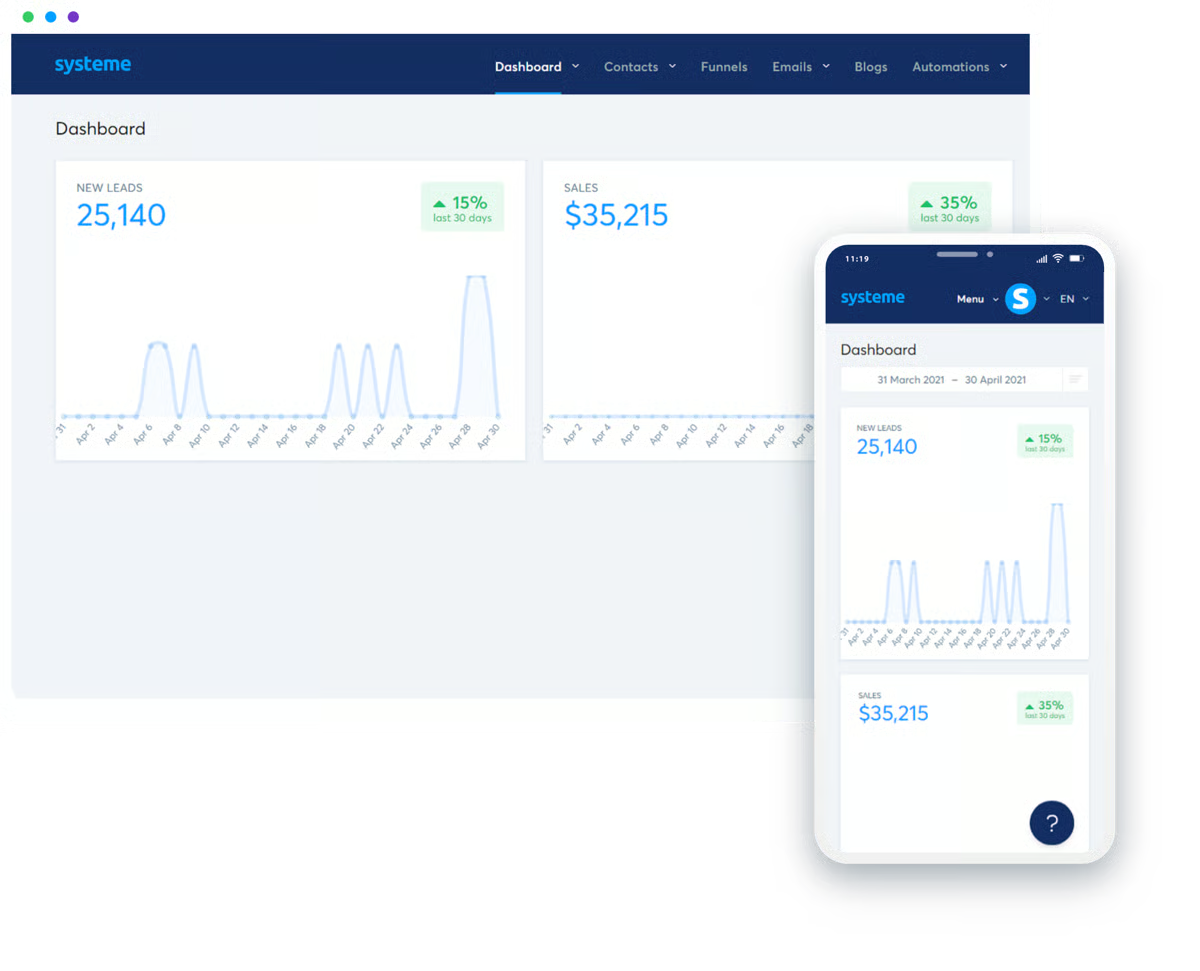
The value proposition for budget-conscious businesses is hard to beat. Systeme.io combines funnels, email marketing, automation, courses, affiliate management, and payment processing in one place and offers a free plan. G2 users rate the platform’s meeting requirements at 93%, and the platform’s 96% likelihood-to-recommend score reflects strong satisfaction among users who want a comprehensive toolkit without paying for multiple subscriptions.
Email deliverability performs reliably across the board. G2 users rate sending outbound emails at 91%, and reviewers report that emails reach inboxes consistently, even when running larger campaigns. For an all-in-one platform, maintaining strong deliverability alongside funnels, courses, and payments is a notable achievement.
The platform continues to evolve regularly, with G2 users rating product direction at 96%. Reviewers frequently mention that new features land consistently, and the development roadmap gives confidence that the platform is adapting to market needs rather than staying static.
The platform offers excellent built-in automation for email sequences, making it easy to set up and run campaigns for most needs. That said, teams looking to build very intricate, multi-branch workflows or heavily logic-based sequences may still want a more specialized email platform alongside Systeme.io. For most creators, coaches, and online businesses, the automation here is more than enough.
Customization is another area with some limits. While templates, page layouts, and the dashboard work well out of the box, there’s less design flexibility for users who want deeper personalization. G2 reviewers often mention that styling options, visual control, and template variety aren’t as expansive as those found in standalone builders. If you prefer clean, functional funnels and quick setup, the current options work well, but designers or brand-heavy teams may find themselves wanting more control.
For solo creators, coaches, and online businesses that want funnels, email, courses, and payments under one roof without juggling multiple subscriptions, it’s one of the most practical and cost-effective choices available.
“I find Systeme.io to be the best cost-effective way to send emails. The free forever plan with up to 2000 subscribers is super helpful, and it’s easy to upgrade as more subscribers join. I appreciate the ready-made templates for creating landing pages, and the whole process is super simple with a good user experience. The unlimited emails plan at $97 per month is something I don’t think any other email service provides, making it affordable for startups. Systeme.io is easy and user-friendly, especially after watching the tutorial video on the platform, which made the initial setup a breeze.”
– Systeme.io review, Sunil J.
“Design flexibility needs to be improved, and also some advanced customization options should be added. The landing page is easy to build, but the templates are limited. Also, it can be made more user-friendly. You need to learn initially to set up automations and systems, which is not that difficult but takes some time to understand.”
– Systeme.io review, Manisha D.
Email platforms help you send campaigns, but blogger outreach software is built for prospecting, follow-ups, and link acquisition.
GetResponse is another all-in-one email marketing platform that stands out in G2 reviews for its depth. The sign-up process is simple, and the platform offers a 30-day trial period without needing a credit card. What G2 reviewers consistently praise is the user interface, which is designed to help even first-time email marketers feel comfortable, thanks to multiple AI-powered tutorials that guide users through the basics.
The email builder and automation templates make it easy to create polished campaigns without needing design or coding skills. Based on G2 reviews, the pre-built workflows are well-structured and ready to use, which explains why GetResponse scores 89% for automated email responses and 89% for building and personalizing emails. Even users who aren’t designers report getting professional results quickly.
GetResponse truly works as an all-in-one platform, letting teams manage emails, landing pages, chats, and automation workflows in one place. Combined with chat tools, landing pages, and paid ads, GetResponse lives up to its promise of being a complete marketing suite. If you’re prioritizing stronger segmentation or multistep automation, the dashboards and workflow options deliver a lot of value for the price.
Campaign delivery reliability is a consistent theme in G2 reviews. Sending outbound emails sits at an impressive 90%, and reviewers report that emails are sent smoothly even in larger batches. Users consistently mention that deliverability is one of GetResponse’s most dependable qualities.
The webinar hosting feature is a genuine differentiator that most email platforms don’t offer. For marketers who use webinars as part of their funnel, lead capture, education, or product launches, having it integrated directly alongside email automation and landing pages saves significant tool-switching and keeps data connected.
Support quality has been consistently positive. G2 users rate it at 90%, and reviewers describe the team as quick, friendly, and extremely helpful when troubleshooting automation or configuration questions. For teams that need responsive help during complex campaign setups, this reliability matters.
The e-commerce integration capabilities add real value for online sellers. G2 rates ecommerce integration at 85%, and the platform connects with Shopify, WooCommerce, and other platforms to enable features like product recommendations, abandoned cart emails, and purchase-based segmentation, making it a viable email marketing platform for ecommerce businesses as well.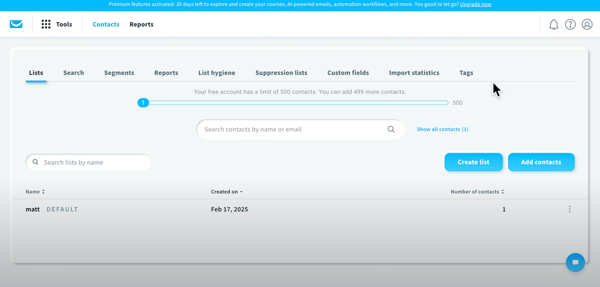
GetResponse offers a wide range of tools in one place, and reviewers note that some areas of the interface, such as analytics and transitions between modules, require some exploration before teams become fully comfortable. This is not necessarily a drawback for marketers who prefer having everything consolidated, but users looking for a very minimal or single-purpose email tool may find a lighter platform better aligned with their workflow.
Pricing is also something to keep in mind. As your list grows, costs can increase faster than with some lightweight competitors. For smaller teams focused solely on basic newsletters, more budget-friendly options might be enough. But for marketers who want landing pages, ads, segmentation, and automation under one roof, GetResponse’s bundled value helps balance the pricing.
GetResponse is a well-rounded, all-in-one platform that works best for marketers who want email automation, landing pages, webinars, and segmentation consolidated in a single dashboard. If you value having everything in one place over lightweight simplicity, GetResponse delivers strong depth at a competitive price.
“It’s very easy to work with, and it offers a lot of templates that I can use. It also integrates smoothly with my other services. The price is very accessible for all the features it comes with. Whenever I’ve run into an issue, the support team has been very helpful and has resolved the problem within minutes.”
– GetResponse review, Jua C.
“A few areas could be better: Some advanced automation features are less flexible compared to other tools. The reporting dashboard could be more intuitive and visually clear. Certain template designs look a bit outdated. Integrations with some third-party tools can also be slow or limited. Customer support can sometimes take longer to reply during busy periods.”
– GetResponse review, Ethan R.
What stands out about Pipedrive in G2 reviews is how naturally it blends email marketing into a sales-first CRM. Rather than being a standalone email platform, Pipedrive treats email as part of the sales workflow; teams send, track, and automate emails directly from the pipeline view, alongside calls, tasks, and deal management.
The visual pipeline management is Pipedrive’s defining strength and the feature that sets it apart from pure email tools. The drag-and-drop deal view makes it easy to see exactly where every opportunity stands, and having email, calls, and tasks connected to each deal keeps everything in context.
Email integration works seamlessly inside the CRM. You can sync your inbox, send tracked emails directly from deal records, and use templates for repeatable outreach. G2 rates sending outbound emails at 86%, and reviewers appreciate that the email tracking, opens, clicks, and replies happen automatically within the deal history, so there’s no need to switch between tools.
Workflow automation helps eliminate repetitive sales tasks. Pipedrive lets you auto-create activities, move deals through stages, and trigger emails based on specific actions. With G2 scoring the platform at 92% for product direction, the automation capabilities continue to expand, and reviewers frequently mention how sequences and automated follow-ups save significant time during prospecting.
Customization is a strength that reviewers highlight often. You can create custom fields, build tailored pipelines for different sales processes, and adjust deal stages to match your workflow exactly. G2 users rate CRM integration at 85%, and the ability to adapt Pipedrive’s structure to different industries, from consulting to SaaS to real estate, makes it versatile beyond a standard sales CRM.
The mobile app performs well for sales teams on the go. Reviewers mention being able to update deals, check emails, and manage tasks from their phone without losing functionality. With an ease-of-use score of 89% on G2, the mobile experience mirrors the desktop’s clean design, which matters to reps who spend time outside the office.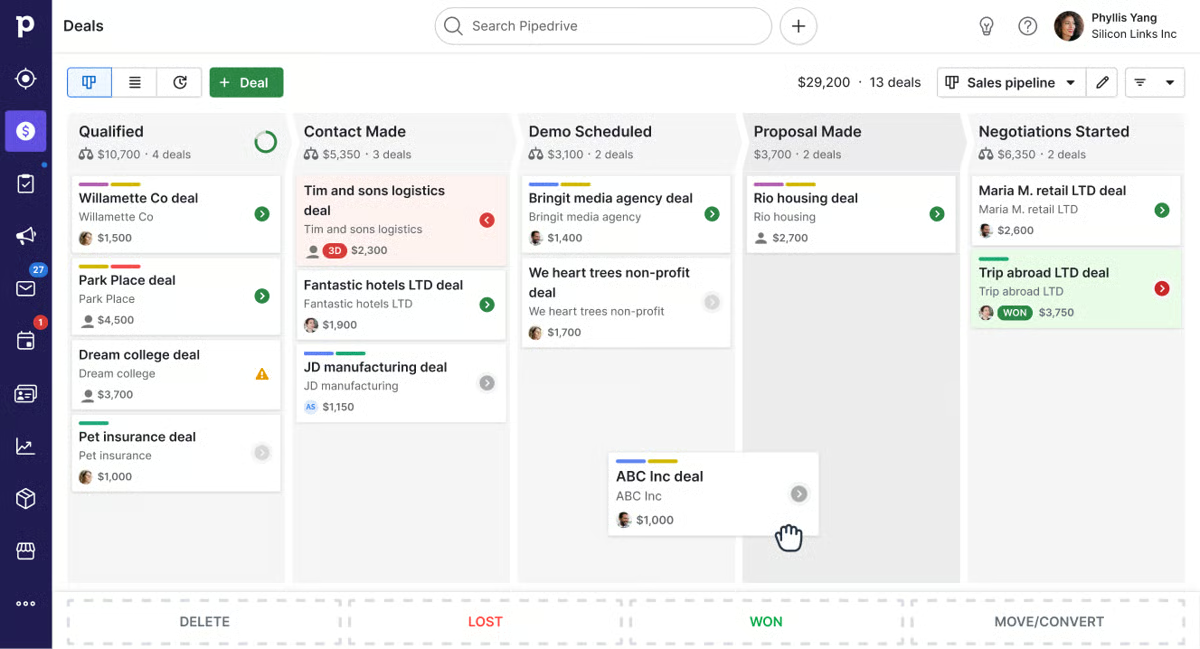
Reporting and analytics offer a clear view of deal flow and team performance. Reviewers appreciate the ability to track activities, conversion rates, and revenue forecasts from a single dashboard. The newer AI-powered reporting features help surface insights faster, which is especially useful for sales managers tracking pipeline health.
Pipedrive’s email marketing capabilities are available through its Campaigns add-on. This works well for sales teams that want email alongside their pipeline, but G2 reviewers note that the email marketing features, like segmentation, A/B testing, and behavior-based automation, aren’t as advanced as dedicated email platforms. For teams running simple promos, nurture sequences, or sales follow-ups, it’s more than sufficient. Marketing-heavy teams running complex multi-branch campaigns may want a dedicated email tool alongside Pipedrive.
Some reviewers also mention wanting deeper native integrations and more robust built-in reporting for email campaigns specifically. Pipedrive integrates with 500+ apps, but a few G2 users note that certain third-party connections require additional setup or external tools like Zapier. For teams with straightforward stacks, the available integrations cover the essentials, but organizations with complex martech ecosystems should verify specific integration needs ahead of time.
Overall, Pipedrive is a dependable, sales-first CRM that keeps communication tight and workflows organized. It’s particularly well-suited for small sales teams, startup founders, and fast-moving outbound reps who want clean outreach, pipeline clarity, and email built directly into their deal management workflow.
“It’s easy to set up and can work in almost any industry. It also integrates with nearly any other tool, and it’s straightforward for the whole team to use.”
– Pipedrive review, Solangel C.
“The mobile app could be better. It was clunky to use when I was on the road visiting customers or at trade shows.”
– Pipedrive review, Patrick D.
Dotdigital is a platform built for marketing teams that need depth, particularly around segmentation, dynamic content, and e-commerce-connected automation. Where some tools focus on simplicity for beginners, Dotdigital focuses on giving established marketing teams the controls they need to run highly targeted, cross-channel campaigns.
The drag-and-drop email builder and journey builder are genuinely well-designed. Reviewers consistently praise how easy it is to create professional-looking emails and build automated programs using drag-and-drop logic. G2 rates building and personalizing emails at 92%, and users highlight how quickly new team members can get comfortable with the email creation workflow.
Segmentation is where Dotdigital really differentiates itself. You can slice audiences by purchase behavior, engagement levels, demographics, or custom data fields, all without writing code. G2 rates managing email deliverability at 91%, and reviewers say the combination of precise segmentation and reliable deliverability means campaigns consistently reach the right people at the right time.
Dynamic content capabilities allow you to create a single email that changes based on the recipient, drastically speeding up workflows for teams managing multiple audience segments. Instead of creating separate emails for each group, you can personalize content blocks within a single template. Reviewers mention this as a genuine time-saver, especially for e-commerce brands running product-specific campaigns.
The e-commerce integrations are a strong suit, with native connections to Shopify, Magento, WooCommerce, and more. Customer and order data sync automatically, enabling automation based on real purchase activity, abandoned cart flows, post-purchase sequences, and win-back campaigns, all of which pull live store data. 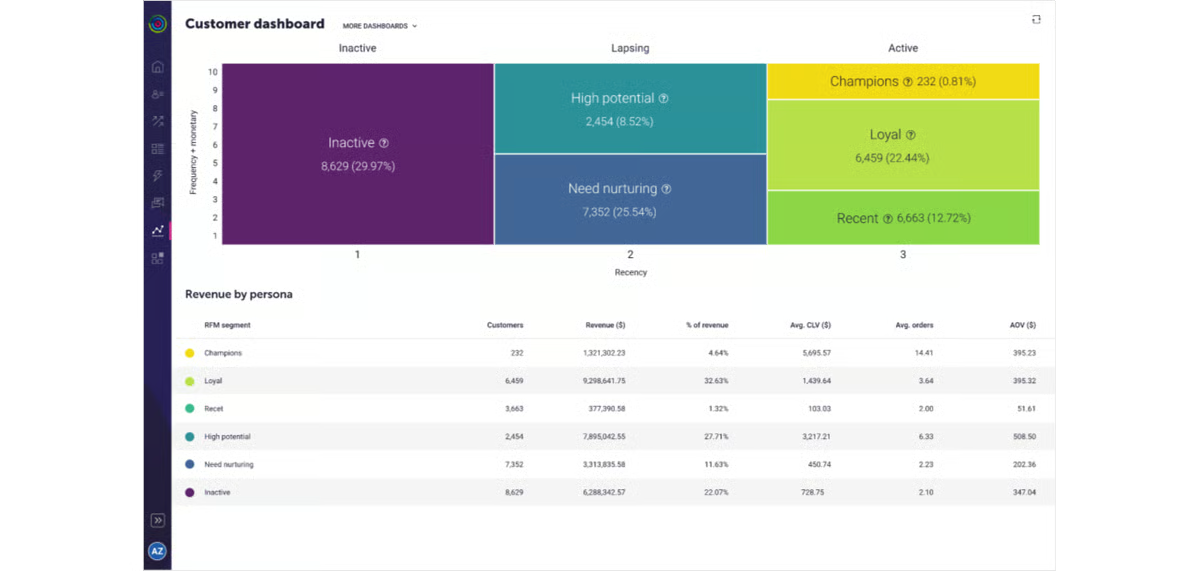
Customer support and dedicated account management are frequently praised. G2 rates the quality of support at 90%, and many reviewers mention their account managers by name, highlighting personalized guidance, proactive insights, and fast issue resolution. For teams that want a partnership rather than just a help desk, Dotdigital’s support model stands out.
The platform continues to evolve with AI-powered features and multichannel capabilities. G2 rates product direction at 91%, and reviewers note that new features, including AI content suggestions, expanded personalization tools, and enhanced journey building, land regularly. For marketing teams that want a platform growing alongside their ambitions, this forward momentum matters.
Dotdigital’s advanced features and pricing structure are better suited for mid-market and enterprise teams with meaningful marketing budgets. Several G2 reviewers note that pricing increases as contact volume scales, and some mention that long-term contracts are part of the commercial model. The platform delivers clear value for teams running complex, cross-channel campaigns at scale, but smaller businesses or teams with limited budgets may find lighter tools more aligned with their needs.
The reporting dashboards are functional but could be more flexible, according to G2 reviewers. While the platform provides solid campaign metrics, some users mention that customizing reports, accessing deeper click-level data, or building dynamic visualizations requires workarounds. For teams that need quick, out-of-the-box insights, the existing dashboards work well, but analytics-heavy marketers may want more granularity than the current reporting provides.
Dotdigital is at its best when used by mid-market and enterprise marketing teams that need precise segmentation, dynamic content, and e-commerce-connected automation across channels. If your campaigns depend on personalization depth and cross-channel coordination, Dotdigital delivers the controls to make that happen at scale.
“I really like that Dotdigital is easy to use, and it has a lot of integrations available which makes it quite versatile. It’s quite technical in how things connect, allowing you to understand the connections and the time it takes for flows to populate. The data management is really robust, and they have strong privacy protocols. The platform also includes a great RFM analysis tool, which I appreciate as it’s free with the platform. Additionally, Dotdigital is like a graduated version of Mailchimp with more automation and data analytics, and the support from the Dotdigital team is really robust, which is second to none. The initial setup was very easy for my team.”
– Dotdigital review, Caitlin X.
“Dotdigital can be a touch basic and misses some finer touches, such as being able to create different versions of an email journey so that you aren’t having to delete or copy previous ones, and can revert if the changes prove to be ineffective. Also, we have an issue where clients have multiple accounts within our business, but all are registered under a single email address. Dotdigital’s inability to use anything except an email address as the contact’s unique identifier has proved problematic.”
– Dotdigital review, Henry O.
Sender.net stands out in G2 reviews for how much it delivers at its price point, and the fact that it starts with a genuinely useful free plan sets it apart from competitors that gate essential features behind paywalls. The platform is focused on doing the fundamentals well: clean email creation, reliable automation, solid deliverability, and fast support.
The free plan is genuinely generous and practical, not just a limited trial. You get access to automation, segmentation, signup forms, and core email features without a credit card, and reviewers consistently highlight that they can run real campaigns on the free tier. G2 rates meet requirements at 95%, making this low-risk entry point a major advantage for small businesses or solo marketers testing the waters.
Deliverability is a standout strength. Emails consistently land in primary inboxes rather than spam, which reviewers mention has noticeably improved their open rates. G2 rates managing email deliverability at 94% and sending outbound emails at 95%, reflecting the platform’s focus on reliable inbox placement, critical for teams that depend on every email reaching its recipient.
Customer support is where Sender.net truly differentiates itself. G2 rates quality of support at 97%, and the reviews are consistently positive, users frequently mention specific support team members by name, praising response times measured in minutes (not hours) and genuine helpfulness. Even free-plan users receive the same level of care, which is uncommon in the email marketing space.
The visual automation builder is easy to set up and handles common workflows like welcome sequences, abandoned cart reminders, and re-engagement flows without needing technical help. G2 rates automated email responses at 93%, and reviewers appreciate that automation is available even on the free plan, making it accessible for teams that want to start automating early without upgrading.
Affordability extends well beyond the free tier. As teams grow, the paid plans remain budget-friendly compared to bigger names like Mailchimp or Constant Contact. G2 users rate the likelihood to recommend at 94%, and reviewers consistently describe the pricing as fair, transparent, and competitive, especially for the feature set included.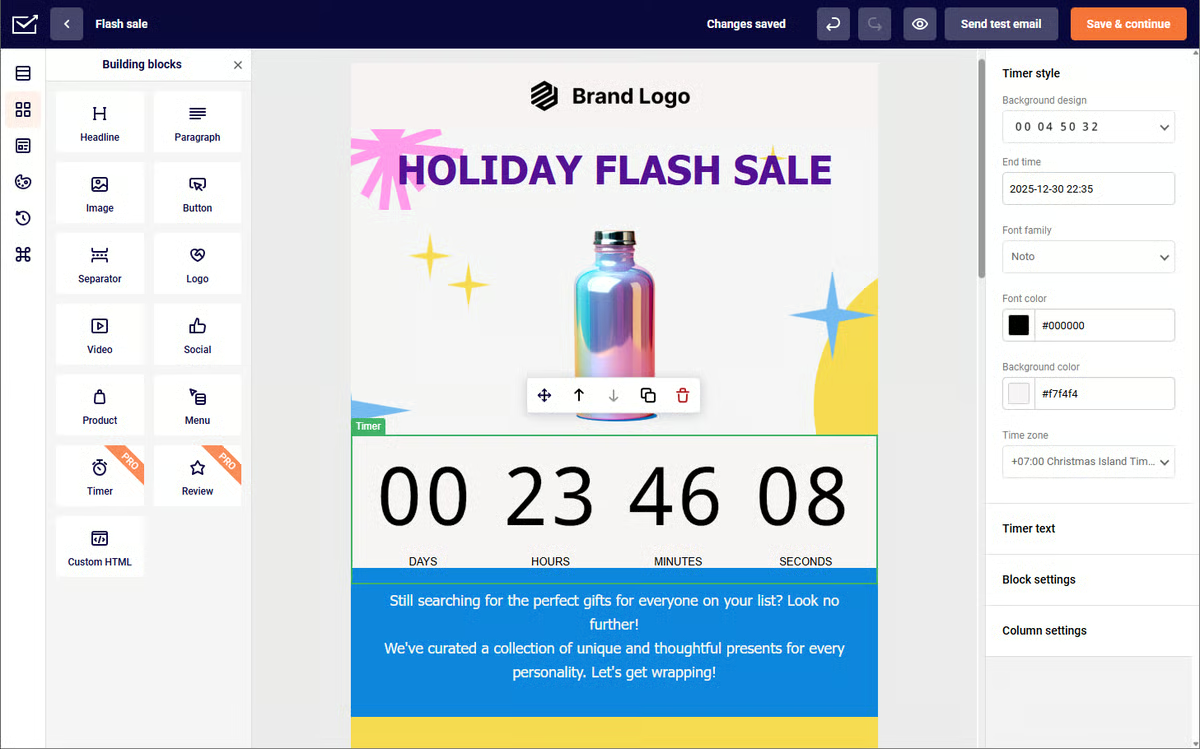
The drag-and-drop email builder is fast and intuitive. Reviewers mention how quickly they can create clean, professional emails without design skills, and the interface keeps things simple without sacrificing functionality. G2 rates building and personalizing emails at 93%, reflecting a builder that balances speed with polish.
The template library is an area where reviewers see room for growth. Several G2 users mention that the current selection, while functional and clean, could benefit from more variety, more modern designs, and additional layout options. For teams that prefer building from scratch or heavily customizing, this won’t be a limitation, but marketers who rely on diverse, ready-made templates may want more options than are currently available.
Reporting and analytics are functional for everyday campaign tracking but remain relatively basic compared to feature-rich platforms. G2 reviewers mention wanting deeper insights, such as heatmaps, long-term performance trends, and more detailed click data. For small teams that need clear open rates, click stats, and campaign performance at a glance, the current reporting works perfectly, but data-driven marketers who require advanced analytics may want to supplement with external tools.
Sender.net is one of the best budget-friendly email marketing platforms available, especially for small businesses, solo marketers, and early-stage teams that want reliable automation, strong deliverability, and exceptional support without a heavy price tag. If you want a platform that does the fundamentals well and grows affordably alongside your business, Sender.net is a smart starting point.
“What I like most about Sender.net is how simple everything feels without compromising on features. The automation flows are easy to set up, and email delivery has been consistently reliable for my campaigns. It saves me time while still giving me full control over personalization and analytics.”
– Sender.net review, Diya G.
“Sometimes the editor feels a bit limited compared to bigger platforms, and I wish there were more advanced design options. The reporting could also be more detailed to better understand long-term campaign performance. The editor would be better with more layout control and more flexible blocks so emails can look more custom and professional. The reporting would improve with deeper insights like heatmaps and clearer long-term trends, so it is easier to understand what content performs best.”
– Sender.net review, Harsh M.
Got more questions? Get your answers below!
Some of the most popular and widely used email marketing platforms include Constant Contact, Intuit Mailchimp, Brevo Marketing Platform (formerly Sendinblue), Systeme.io, and Moosend. Each platform offers unique strengths, Constant Contact is great for beginners and small businesses, Mailchimp for automation and segmentation, Brevo for transactional emails and CRM integration, and Systeme.io for all-in-one business tools like funnels and courses. Moosend, meanwhile, stands out for affordability and personalization options.
If customer support is your top priority, Sender.net (97% on G2), Instantly (97%), Systeme.io (96%), and lemlist (92%) stand out for responsive, helpful support. These platforms are known for fast human responses, proactive troubleshooting, and accessible knowledge bases that make setup and troubleshooting stress-free.
Top e-commerce email marketing platforms include Mailchimp, Dotdigital, and GetResponse, all of which offer ecommerce integrations with Shopify, Magento, and WooCommerce. They support features like abandoned cart recovery, product recommendations, and purchase-based segmentation to help online stores boost conversions through personalized, data-driven campaigns.
The best way to choose an email marketing software is to consider your key requirements: email send limits, automation depth, deliverability, ease of use, and integration needs. Consider choosing a platform that’s within your budget and meets your business needs with features that can scale as you grow.
For newsletters, Constant Contact is ideal for small to medium businesses thanks to its pre-built templates, strong deliverability, and easy scheduling. Intuit Mailchimp is a great choice for growing businesses that want automation, list segmentation, and AI-powered recommendations. Sender.net is also worth considering for teams that want a budget-friendly newsletter platform with reliable deliverability and clean templates.
Several platforms offer strong CRM integrations: Pipedrive combines built-in CRM and email marketing for sales teams, Dotdigital connects with Salesforce, HubSpot, and Microsoft Dynamics for enterprise workflows, and Constant Contact and Mailchimp easily connect with CRMs like HubSpot, Zoho, and Pipedrive. These integrations help align sales and marketing efforts for better customer insights.
If analytics are your priority, consider GetResponse for visual dashboards and advanced segmentation reports, Intuit Mailchimp for in-depth analytics on open rates, click-throughs, and engagement trends, and Instantly for clean, actionable outbound campaign reporting with strong A/B testing (93% on G2).
Startups looking for affordable solutions should explore Sender.net (free plan with full automation), Systeme.io (free plan with funnels, email, and courses), and Brevo (free plan with daily email limits and built-in CRM). These tools help startups launch professional email campaigns without high upfront costs.
Email marketing software helps you create, send, and optimize campaigns with ease. You choose a platform, build and segment your subscriber list, and set up automations like welcome or re-engagement emails. The tool lets you design emails, personalize content, and stay compliant with regulations. It also tracks performance through analytics, showing key metrics like opens, clicks, and conversions, so you can refine your strategy over time.
Yes, email marketing is absolutely worth it. It remains one of the most effective ways to connect and engage with customers, promote newsletters, make announcements, and share important company updates. With its proven ROI and ability to deliver targeted, personalized communication, email marketing continues to be a valuable strategy for businesses of all sizes. The market is expected to surpass $12 billion in revenue by 2026, further confirming its importance.
For automation depth, Instantly leads for cold outreach automation (97% for sending outbound on G2), GetResponse for autoresponders and multi-step workflows (89% for automated responses), and Systeme.io for combining email automation with funnels and course delivery (91% for automated responses). lemlist also stands out for multichannel automation across email, LinkedIn, and calls.
For agencies managing client campaigns, Instantly and lemlist work well for outbound-focused outreach, Instantly for high-volume cold email with strong deliverability, and lemlist for multichannel prospecting across email and LinkedIn. GetResponse suits inbound agencies with its all-in-one mix of landing pages, automation, and webinars. Pipedrive is a solid pick for agencies that want email tightly connected to CRM and deal tracking.
Each email marketing software is created to fit different businesses. After testing these tools in real-world scenarios, it’s clear to me that the best tool may differ from user to user. In the above list compiled by me, you can find the best tool for you, from beginner-friendly options with intuitive templates to all-in-one platforms with powerful automation.
If you’re just starting out, I suggest prioritizing simplicity and ease of use. For advanced marketers, I recommend looking out for features like advanced segmentation, AI-powered personalization, and integration options.
Ultimately, the best email marketing tool is the one that helps you build stronger connections and achieve your marketing goals. Take a little time to explore and experiment, and I am sure you will find the platform that fits your needs.
Want to streamline outreach across every touchpoint? Explore the best sales engagement software to help your team prospect, follow up, and close deals faster.
Bhoomika Pawar is a Jr. SEO Specialist with over three years of experience in search engine optimization. With a background of working in e-commerce companies and digital marketing agencies, she likes dabbling and learning all about marketing, user experience, and data. In her spare time, Bhoomika is either reading in a corner, cuddling with her pets Luffy and Shiro, discovering new eateries, or exploring hill stations. Connect with her on LinkedIn.
Email Marketing
Do you cringe at the thought of one-size-fits-all email blasts? I get it.
Marketing
As a marketer, you know the inbox is a competitive place. Your email is just one of dozens,…
Sales & Marketing
I live and breathe emails.
Email Marketing
Do you cringe at the thought of one-size-fits-all email blasts? I get it.
Marketing
As a marketer, you know the inbox is a competitive place. Your email is just one of dozens,…
By downloading this guide, you are also subscribing to the weekly G2 Tea newsletter to receive marketing news and trends. You can learn more about G2’s privacy policy here.