Text messaging has been around for more than 30 years, but the basic SMS technology many phones still fall back to has barely changed. It can send short text messages almost anywhere, which is useful, but it was never built for high-resolution photos, videos, read receipts, typing indicators, emoji reactions, or modern group chats.
That’s where Rich Communication Services, better known as RCS, comes in. RCS is designed to bring regular phone-number texting closer to what people already expect from apps like iMessage, WhatsApp, Messenger, and Google Messages. It keeps the basic idea of texting someone by phone number, but adds richer features that SMS and MMS were never built to handle.
The tricky part is that RCS is not one single app. It depends on your phone, your messaging app, your carrier, and the person you are texting. That’s why RCS can feel simple when it works and confusing when it doesn’t.
RCS matters more in 2026 because it is no longer just an Android-heavy texting upgrade. Apple added RCS support to the iPhone with iOS 18, which made Android-to-iPhone texting much better than old SMS/MMS. Messages between iPhone and Android users can now support higher-quality media, read receipts, typing indicators, and better group chats when both sides and their carriers support RCS.
The next major piece is encryption. Google Messages already offers end-to-end encryption for many RCS conversations between Google Messages users, but cross-platform encryption between iPhone and Android has been the missing piece. Apple and Google are now moving toward end-to-end encrypted RCS between iPhone and Google Messages, with iOS 26.5 expected to bring that support to compatible conversations. That doesn’t make RCS the same as iMessage, but it closes one of the biggest gaps.
SMS was originally developed in the 1980s and entered the mainstream in the early 1990s. The first SMS text message was reportedly sent in December 1992, when Vodafone engineer Neil Papworth sent “Merry Christmas” to his boss, Richard Jarvis.
SMS became popular because it was simple and reliable. It worked across carriers, did not require a smartphone, and could reach almost anyone with a mobile number. Even today, that’s still its biggest strength. SMS works on everything from basic feature phones to modern smartphones like the latest iPhone and Samsung Galaxy models.
The problem is that SMS was built for a much simpler era. It is limited to short plain-text messages, and while modern phones hide some of that clumsiness by splitting and stitching longer messages together, the underlying standard is still old.
MMS arrived later to let people send photos, audio, and short videos. It helped, but it did not age well either. MMS media is often compressed heavily, and the experience can still feel crude compared with modern messaging apps.
As smartphones became the norm, people moved to apps that handled messaging better. iMessage, WhatsApp, Messenger, Telegram, and others offered richer features because SMS and MMS were not keeping up. RCS was created to modernize carrier texting without asking everyone to download yet another app.
RCS stands for Rich Communication Services. It is a messaging standard designed to replace SMS and MMS with a more capable system for texting between phone numbers.
With RCS, supported conversations can include:
RCS was proposed to the GSMA in 2007, so it is not exactly new. The problem was adoption. Carriers, phone makers, and platforms all had to support it, and that made the rollout slow and messy.
Google eventually pushed RCS forward by building support into Google Messages and using its Jibe platform to help carriers adopt the standard. Over time, Google Messages became the default messaging app on many Android phones, including newer Samsung Galaxy devices.
That helped RCS become the closest thing Android has to a default modern texting layer. Apple’s later support for RCS on iPhone made the standard much more relevant because it improved texting between iPhones and Android phones, which had been stuck on SMS and MMS for years.
RCS is designed to replace SMS as the main texting standard on smartphones, but SMS is not going away soon.
The reason is simple: SMS still works almost everywhere. It doesn’t need Wi-Fi or mobile data, and it works on basic phones that will probably never support RCS. It also acts as a fallback when RCS is unavailable.
That fallback matters. If you send a message and RCS is not available, your phone can usually send it as SMS or MMS instead. It is not as rich or secure, but it is reliable.
For most smartphone users, though, SMS should become less common over time. As more phones, carriers, and messaging apps support RCS, regular text conversations should increasingly use RCS by default.
You may have seen the term “RCS Chat” or “Chat features,” especially in Google Messages. This usually refers to Google’s implementation of RCS inside the Google Messages app.
That distinction matters because Google has added features on top of the baseline RCS standard. The most important example is end-to-end encryption, which Google Messages has supported for many RCS conversations between Google Messages users.
The broader RCS Universal Profile supports the key modern messaging features most people care about, including higher-quality media, read receipts, typing indicators, group chats, and reactions. However, not every advanced feature works the same way across every app or platform.
That’s why RCS can feel a little uneven. A conversation between two Google Messages users may support more features than a conversation between different messaging apps or platforms. The gap is getting smaller, but it has not disappeared.
RCS support depends on your phone, messaging app, carrier, and region.
On Android, the easiest path is usually Google Messages. Many Android phones now ship with Google Messages as the default app, and Google’s RCS infrastructure helps make the feature widely available even when carrier support varies.
Samsung has also moved closer to Google Messages. Newer Galaxy phones often use Google Messages as the default texting app, while Samsung Messages has become less central to Samsung’s messaging strategy.
On iPhone, RCS requires iOS 18 or later and a carrier that supports RCS on iPhone. Apple doesn’t run its own RCS service in the same way Google does with Jibe, so carrier support still matters.
That’s the annoying part. Two people can both have modern phones and still fall back to SMS if one carrier, device, or app doesn’t support RCS properly. When everything lines up, though, RCS works automatically.
Yes. Apple added RCS support to the iPhone with iOS 18.
For iPhone users, RCS is mainly an upgrade for conversations with Android users. It doesn’t replace iMessage. If you are messaging another iPhone user, iMessage still handles that conversation with Apple’s own features, including end-to-end encryption, blue bubbles, message editing, undo send, iMessage apps, and syncing across Apple devices.
When an iPhone user texts an Android user over RCS, the conversation still appears in green bubbles. However, it can support better features than SMS or MMS, including higher-quality photos and videos, read receipts, typing indicators, and better group chats.
The biggest limitation has been encryption. Apple’s original RCS support used the official RCS Universal Profile, while Google’s existing RCS encryption was a Google Messages extension. That meant Android-to-iPhone RCS messages were not end-to-end encrypted at first.
That’s now changing. The GSMA has added support for interoperable end-to-end encryption to the RCS standard, and Apple is moving to support encrypted RCS in future software updates. With iOS 26.5, Apple is expected to add end-to-end encrypted RCS between iPhone and Google Messages on Android, assuming both sides are using supported software and services.
RCS still doesn’t make Android texting identical to iMessage. Apple’s iMessage remains its own platform, and it still has features that RCS doesn’t fully match across devices. But RCS makes the basic experience of texting between iPhone and Android much less painful.
The best part about RCS is that you usually don’t need to think about it. If your phone, messaging app, carrier, and recipient all support RCS, your message should send as RCS automatically.
On Android, Google Messages is the simplest route.
You can also check the status on this screen. If it says Connected, RCS is ready. If it says Connecting or Not supported, your phone may still be verifying your number, your app may need an update, or your carrier/device setup may not support RCS properly.
On iPhone, you need iOS 18 or later and a carrier that supports RCS.
If you don’t see the RCS Messaging setting, your carrier may not support RCS on iPhone yet, or RCS may not be available in your region.
Once RCS is enabled, you use it the same way you use normal texting. Open your messaging app, choose a contact, and send a message. If the conversation supports RCS, your phone will use it automatically. If it doesn’t, the message will fall back to SMS or MMS.
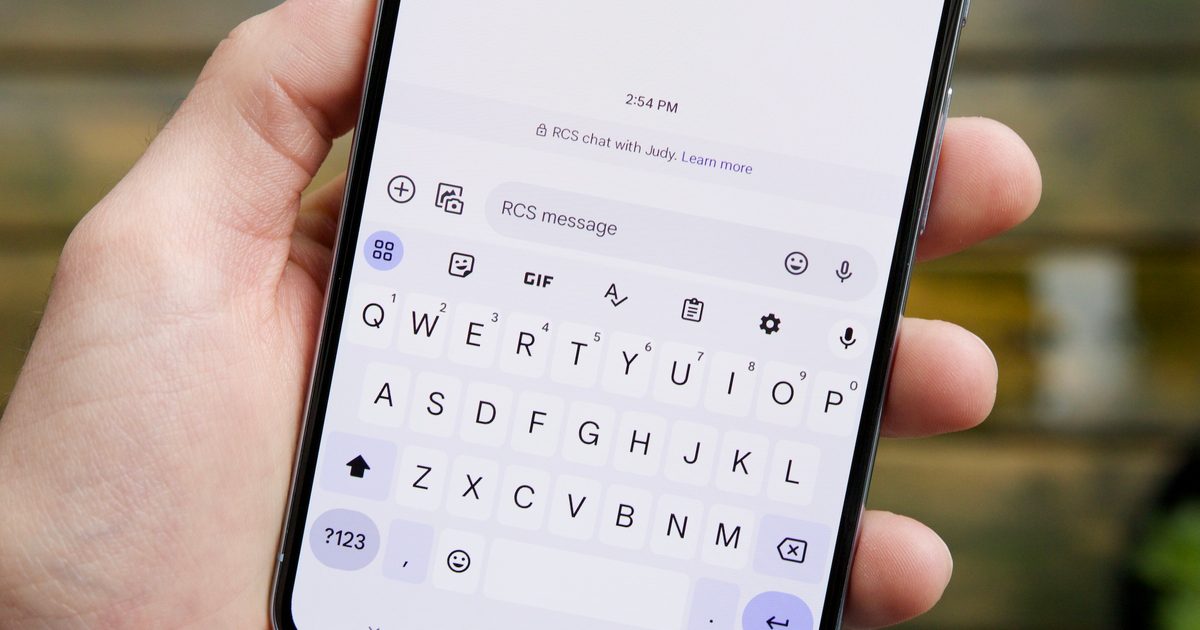
On iPhone, you may see Text Message • RCS in the message field. On Android, Google Messages may show RCS message in the compose box. Read receipts and typing indicators are also good signs that RCS is active.
RCS is better because it feels closer to a modern messaging app while still using your phone number.
SMS is reliable, but basic. MMS adds media, but the quality is often poor. RCS is designed for modern smartphones, so it can handle richer conversations without forcing both people to use the same third-party app.
The biggest everyday improvements are media quality and group messaging. Sending a photo or video over SMS/MMS can result in ugly compression. RCS can preserve much better quality. Group chats can also behave more like modern app-based conversations, with better participant handling and richer features.
RCS also supports read receipts and typing indicators, which are small features until you lose them. They make texting feel less like shouting into a mailbox.
The security story is improving, too. RCS was not originally as strong as iMessage or WhatsApp for encryption, especially across platforms. Google added encryption to many Google Messages conversations, and the newer RCS standard is moving toward interoperable encryption between providers. That’s a major step, but it still depends on software and platform support.
The biggest downside of RCS is fragmentation.
RCS works best when both people have compatible phones, updated software, supported carriers, and the right messaging apps. If any piece is missing, the conversation may fall back to SMS or MMS.
RCS also depends on mobile data or Wi-Fi, unlike SMS, which can work over the basic cellular voice network. That means SMS remains useful when data is unavailable.
There is also the platform problem. RCS improves Android-to-iPhone texting, but it doesn’t erase the divide between iMessage and everything else. iPhone-to-iPhone conversations still use iMessage, and Apple’s messaging ecosystem still has features that RCS doesn’t fully replicate.
Finally, RCS business messaging and spam are becoming more visible as the standard grows. That’s not unique to RCS, but any messaging system tied to phone numbers eventually attracts businesses, marketers, and scammers. Texting never gets nice things without someone trying to sell you an extended warranty for your soul.
RCS has had a slow and awkward path, but it is finally becoming the universal texting upgrade it was supposed to be. Google pushed it forward on Android, Apple brought it to iPhone, and the GSMA’s newer RCS standards are addressing one of the biggest missing pieces: interoperable encryption.
That doesn’t mean RCS will replace WhatsApp, iMessage, Signal, Messenger, or Telegram for everyone. Those apps still offer features, ecosystems, and privacy models that carrier-based messaging cannot fully copy. RCS is also tied to phone numbers, which makes it less flexible than account-based messaging services that work across tablets, laptops, and multiple devices.
Still, RCS is a major improvement over SMS and MMS. It makes default texting feel less ancient, especially between Android phones and iPhones. As carrier support improves and encrypted cross-platform RCS rolls out more broadly, old-school SMS should become more of a fallback than the main event.
For something as basic as texting, that’s probably the right goal. RCS doesn’t need to beat every messaging app. It just needs to make the default option less terrible.
Xiaomi has long been accused of taking inspiration from Apple. But this time around, the inspiration needs to move the other way. The company has expanded its paid battery upgrade program in China to cover the Xiaomi 13, Xiaomi 13 Pro, and Xiaomi 13 Ultra.
Unlike a typical battery replacement, where a company simply swaps the worn-out cells with the same capacity, Xiaomi is offering larger batteries that give older phones a boost in endurance.
Apple’s long-delayed Siri upgrade is no longer just an embarrassing AI setback, as the company has agreed to a very real, very hefty settlement. The company is paying $250 million to settle a class-action lawsuit alleging it misled iPhone buyers in the US about the AI-powered Siri features announced as part of Apple Intelligence.
According to the Financial Times, the case centers on Apple’s promise of a more personalized Siri that was first shown at WWDC 2024 and promoted alongside newer iPhones.
Android security is getting another layer of accountability, and it’s aimed squarely at a problem that digital signatures can’t solve. Google has announced that it is expanding Binary Transparency across the Android ecosystem. Starting with the production of Google apps for Android and Mainline modules, the company will log official releases on a public append-only ledger, which should make it easier to verify whether the software running on a device is the exact version Google intended to release.
Why digital signatures no longer cut it
Upgrade your lifestyleDigital Trends helps readers keep tabs on the fast-paced world of tech with all the latest news, fun product reviews, insightful editorials, and one-of-a-kind sneak peeks.

What is RCS messaging? The texting upgrade explained in 2026 – Digital Trends